Tool · 2026 · macOS application
Commodore File Browser.
A two-panel file manager for the Mac in which a disk image behaves like a folder. Copy files into a D64 or an ADF and back out again, with the directory drawn from the machine’s own character ROM — and press Return on a tune to hear it.
Eleven image formats, from the 1541 to Amiga hardfiles, a player for both SID tunes and tracker modules, and the pictures inside them drawn in their own colours.
September 2026
This one started from a simple annoyance. I have a couple of hundred disk images lying around — D64s from the SD card of my C64, ADFs and DMS archives from the Amiga days — and getting a single file into or out of one of them meant firing up an emulator, or a command line tool, or some Java thing from 2004. What I actually wanted was a Norton Commander: two panels, one of them the Mac, the other one the inside of a disk image, and F5 to copy between them.
So I wrote one. It is a native macOS application, built with SwiftUI and AppKit. The window chrome is all system controls — the retro part belongs to the content, not to the buttons.
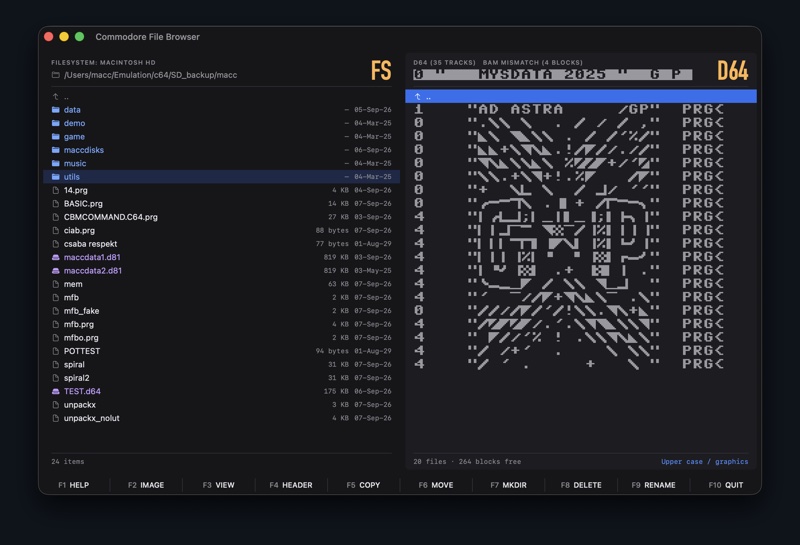
01The directory is drawn, not translated
The thing I cared about most is on the right hand side of that screenshot. Inside an image,
every row is rendered from the actual character.rom, exactly the way a 1541 prints
a directory: block count, quoted name, file type, < for a locked file,
* for one that was never closed properly. The reverse-video header line carries
the disk name, the ID and the DOS type.
This matters because scene disks do not use their directories the way normal disks do. They
draw with them. A pile of zero-length DEL entries becomes a logo, a rule, a
border — and if you convert the names to ASCII for display, which is what most tools do,
the whole picture falls apart into punctuation. Here the name bytes are never converted, so it
comes out the way it was meant to.
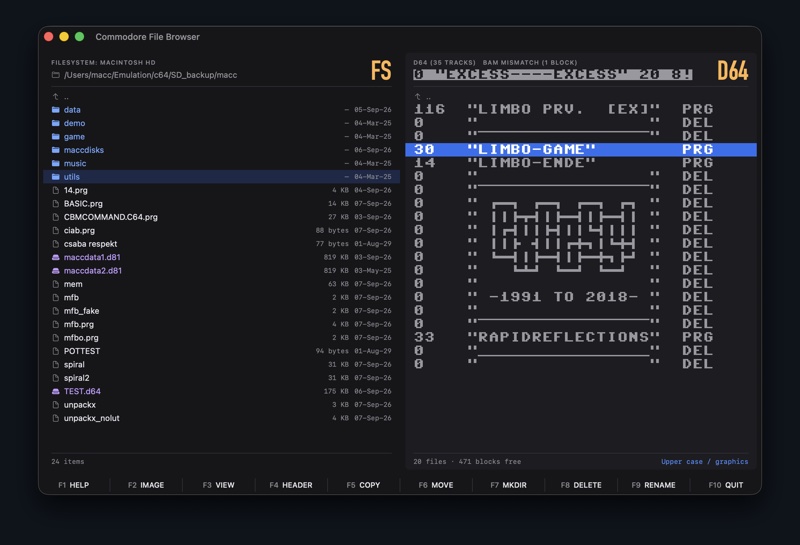
There is a switch in the bottom right for upper case / graphics, because a C64 has two character sets and a directory can be written for either one. Ctrl-Shift flips it, exactly like on the real machine. It can also draw from the PET ROM instead, for the 8050 and 8250 disks.
02And it can be written back, byte by byte
Drawing a decorated directory properly is half of it. The other half is being able to make one, and that is where a plain text field runs out. The system font will spell a file name; it cannot spell the reverse-video blocks and the graphics characters a scene directory is written in, because no key on a Mac keyboard produces them.
So the disk header, rename and add DEL entry dialogs each carry an Advanced disclosure that opens onto the bytes themselves. The field becomes a row of cells drawn from the character ROM, with a caret that steps along as you type, and under it a grid of every character no key reaches — the graphics, the reverse video forms, the shifted space — in either half of the ROM, or all 256 bytes if you ask for that.
Rename opens on the whole sixteen byte name field, past the shifted space as well as before it, and that is the detail which makes decorated rows possible at all: a drive closes the quote at the first shifted space and prints the rest of the field after it as ordinary characters, which is exactly where the graphics live. Beside the name sits the block count the row prints, written as given and checked against nothing — so a directory can count in pictures rather than in blocks. And blocks free in the header sets the figure the listing ends on by moving the per-track counters and leaving the allocation map alone, which is how a demo disk claims to be empty with every one of its files still on it.
03What it can open
It started as a D64 tool and then kept growing sideways. At the moment it reads and writes:
Commodore
- D64 — 1541, at 35, 40 or 42 tracks, with or without error info
- D67 — the 2040, one more sector on the second zone than the 1541
- D71 — 1571, both BAM halves
- D81 — 1581
- D80 and D82 — the 8050 and 8250 of the PET drives
- X64 — the old VICE container
- T64 — tape archives, rebuilt on write
Amiga
- ADF — 880K and 1.76M floppies, OFS and FFS, plain, international or with a directory cache
- HDF — UAE hardfiles, either one bare volume or a Rigid Disk Block with partitions
- DMS — DiskMasher archives, browsed in place or unpacked to an ADF
Writing is the part that took the time. On the Commodore side that means allocating blocks outwards from the directory track with the proper interleave, growing the directory by a sector when the current one fills, and keeping the BAM free counts in step. On the Amiga side directories are hash tables rather than lists, so it walks the chains and shows what a real AmigaDOS would — including the entries a naive reader loses when two names land in the same bucket — and writing keeps the bitmap, the hash chains and, where the volume has one, the directory cache all consistent.
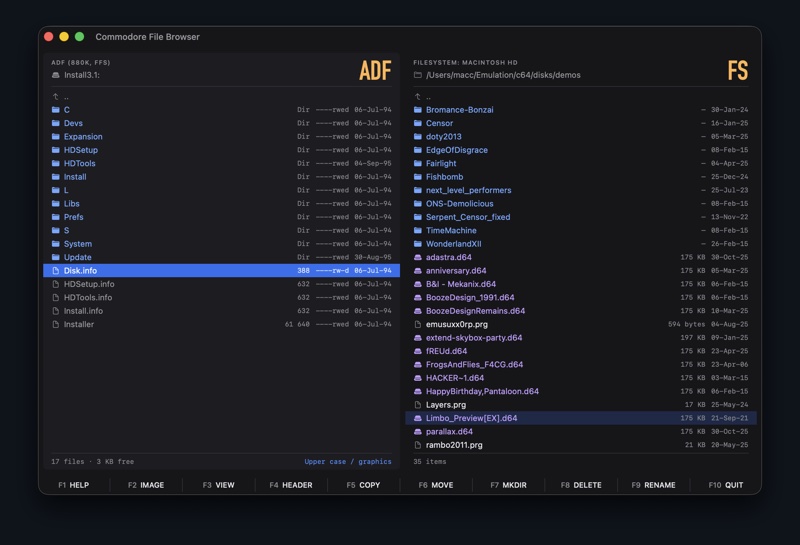
A hardfile is read through a memory map and written a block at a time, so changing one directory entry on a two gigabyte image writes one block rather than rewriting two gigabytes.
04Editing an image is a transaction
Entering an image loads it into memory, and every copy, delete, rename, reorder and header edit
happens to that working copy. The file on disk is not touched until the panel leaves. Walking
out normally commits it; Esc leaves without committing and asks first if anything
is pending; ⌘S commits without leaving. While there are unsaved edits the panel
header reads MODIFIED, so you can see the state before you reach for Esc.
I did it this way because a half-written disk image is worthless, and because it makes experimenting free — reorder a directory, insert a few DEL entries to draw something, change your mind, walk out without saving.
It is still a program that writes to disk images, though, and a mistake in it can damage a file nobody has another copy of. So the first launch says one thing before anything else and asks nothing: keep a backup of any image you would be sorry to lose. A D64 is 170 KB and an ADF 880 KB — a spare copy costs nothing against a disk there is no second of.
05Looking at what is on the disk
F3 opens a viewer with three modes. Hex is the obvious one, with a switch for
whether the first two bytes are a load address or just data. Basic detokenises a Commodore
BASIC program and lists it in the Commodore font. And Bitmap draws the file one pixel per bit.
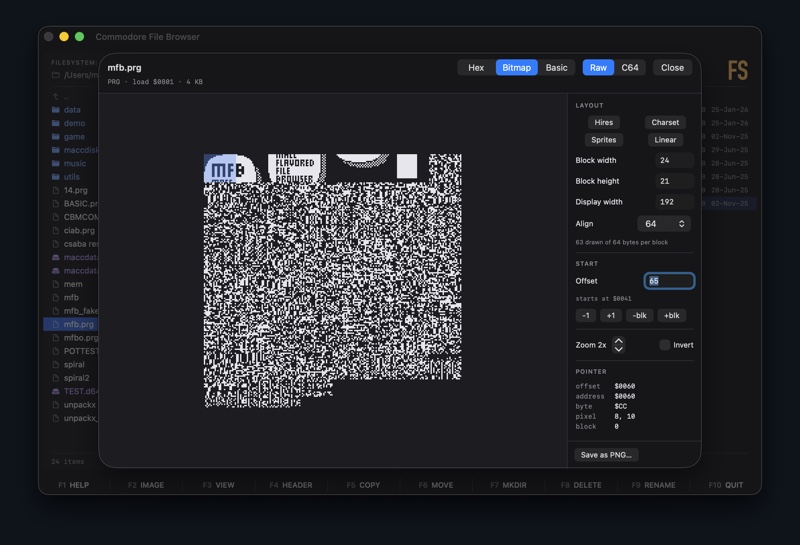
The bitmap viewer is the one I use most and it is barely any code. Bytes are tiled as blocks of a given width and height; inside a block the bytes run in raster order, eight horizontal pixels each, and the blocks tile left to right and wrap down. That single mapping is the whole feature, and it means the interesting layouts are just numbers: 8×8 blocks 320 wide is a C64 bitmap screen, 24×21 is sprites, 8×8 at 128 wide is a character set.
That mode is for files that were never pictures. The ones that were get a mode of their own.
06Pictures, in their own colours
The viewer has a fourth mode, and it is the one thing in the browser that is not two colours tinted from the theme. A picture brought its own thirty-two, and the whole point of showing it is to see them.
On the Amiga side that means IFF ILBM. A picture was held as one bitplane per bit of depth, every plane a full page of its own, and a pixel’s colour index is one bit taken from the same place in each of them — after which two OCS tricks reinterpret the result. EHB makes the upper 32 indices the lower 32 with every gun halved; HAM makes most pixels not a colour at all, but a change to one channel of the pixel to the left. Both exist to get more colours out of a palette than the palette has room for.
Amiga
- ILBM, one to eight planes,
ByteRun1packed or plain - EHB, and HAM6 and HAM8
- A mask plane kept where a stencil’s colour planes would be
- The first frame of an ANIM, with the subtitle saying how many are not being shown
- Palettes written four bits a gun are widened, or every colour comes out at half brightness
Commodore
- Koala Painter —
$6000, 10003 bytes, multicolour - Art Studio and Advanced Art Studio —
$2000, hires and multicolour - Doodle, Hi-Eddi — hires
- Face Painter, Run Paint, Interpaint
- Paint Magic —
$3F8E, 9332 bytes - Amica Paint — packed, so it is unpacked on spec to find out
- Blackmail FLI — eight video matrices, one per raster line
- Raw screen dumps, with a load address or without one
The Commodore half of that list is the interesting one, because none of those files has a header, a magic number or anything else that says what it is. A painter of the day dumped the VIC-II’s memory to disk and its loader put it back where it came from. So a format is recognised by its exact length and its load address together, which is narrow enough that an ordinary program almost never falls into it — and when neither matches, the file is refused rather than guessed at. Almost all of them are the same four pieces in a different order — 8000 bytes of bitmap, a 1000 byte video matrix, 1000 bytes of colour RAM and a background colour — so they are a table rather than a decoder each.
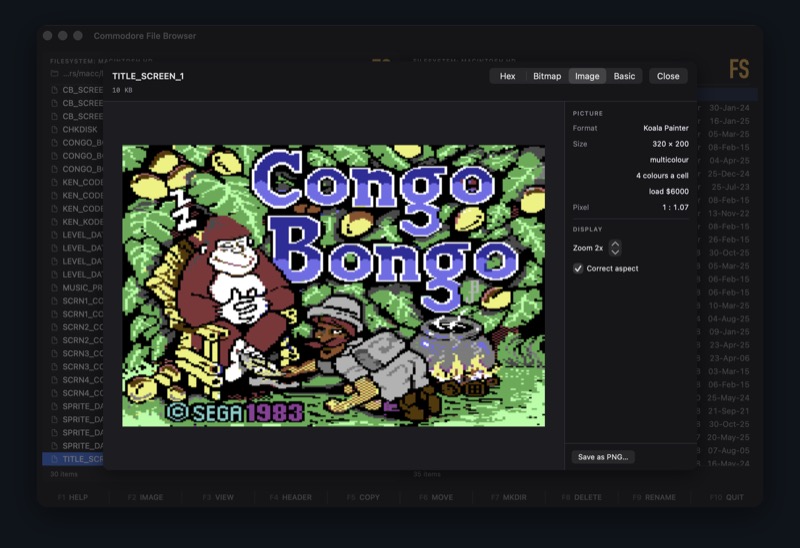
Paint Magic is the odd shape in that table, because it saves the picture inside the program
that shows it: 114 bytes of display code first, which is exactly what puts the bitmap on the
$2000 boundary the VIC needs and the video matrix at $6000. There is
no published description of the format, so the offsets here are the ones that code itself uses
— and the surprise is at $5F43, a single byte from which it fills
the whole of colour RAM. That is why the file carries no page of colour RAM at all, and
why reading it for one, finding none and concluding that the format must be hires gets it
wrong: it is multicolour, with three colours per cell of its own and one the screen shares.
The C64 colours are Colodore’s — the measurements of a real machine that emulators and modern tools have settled on, since the VIC-II had no palette to read and every RGB set for it is somebody’s photograph of a television. Correct aspect matters more here than on the Amiga, where the file at least records the pixel shape: on a C64 it was a property of the television, not of the picture. And an FLI picture comes out 296 pixels wide rather than 320, because the chip has no time left to fetch the leftmost three character columns.
07Playing the music
Half of what is on these disks is music, so pressing Return on a tune plays it. For
SID files the addresses come from a PSID or RSID header when there is one, from the file name
when it follows the old scene convention (Z10 I1000 P1003 means init at
$1000 and play at $1003), and failing both, from the player’s
own code.
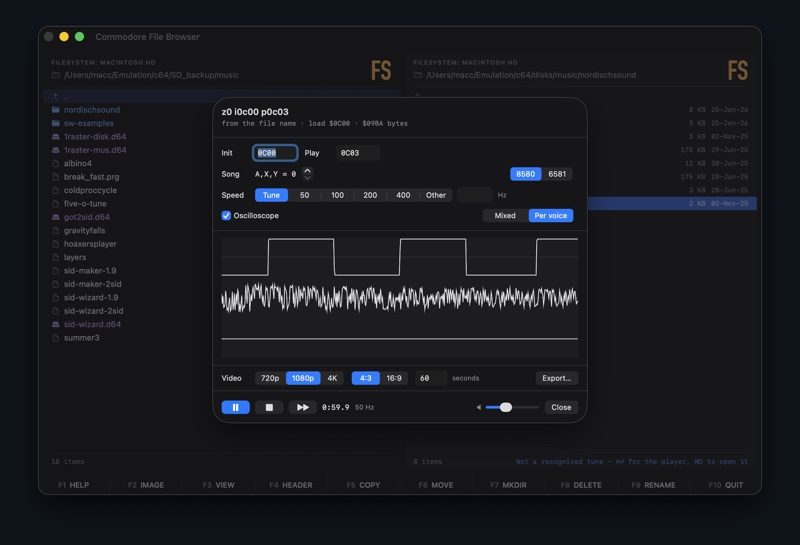
That last one turned out to be a nice little detective job. I have a stack of Music Assembler
disks where every tune is called something like s.mac.14 and nothing in the file
says where its routines are. But the editor saves the player in front of the tune at a fixed
layout, so the player’s own code is the signature: init sits $48 past the
load address, and the interrupt handler that drives the music $18 past it.
Checking two places in that code recognises 256 tunes across fifteen disks without
reading a single file name. Around a fifth of them have had a rip banner written over the first
bytes, which takes the interrupt handler with it — for those it calls the routine the
handler would have called, $21 on, and they play just the same.
There is an oscilloscope, either mixed or one trace per voice, and it can be exported to an mp4 with the tune as its soundtrack. That runs offline rather than in real time: for every video frame it renders exactly one frame’s worth of audio and then draws, so picture and sound stay locked together however long the export takes.
08And the tracker modules
Return plays Amiga modules too, and this is where the naming problem gets properly
annoying. Amiga files are not named the way Mac files are. The convention is a prefix —
mod.crockets, not crockets.mod — and plenty of files carry
nothing at all. Of the modules sitting inside my own ADF and DMS images, five are called things
like KONMOD, LSMmiuzik and oliNBP. Reading the name was
never going to find those.
So it reads the bytes instead. Every format worth playing announces itself somewhere: four
characters at offset 1080 for the classic 31-sample Amiga module, a mark at the front for the
trackers and the chiptune editors. A mark on its own is not quite enough, though, and I have a
favourite counter-example for that. The ProTracker playroutine source carries a line reading
EQU 1080 ;"M.K." :) — a comment naming the offset of the mark — and in
that file the comment lands at offset 1080. For a while the browser was offering to play
68000 assembly.
What settles it is arithmetic. A module states how long each of its 31 samples is and which patterns it plays, and header plus patterns plus samples account for the file exactly, once you size a pattern by the channel count its mark spells out. All 98 modules in my collection balance to the byte. The assembly source claims 1.2 MB of samples inside a 25 KB file, so out it goes.
The numbers, since I had the collection sitting there to check against: 152 modules found in the music folder and 47 more inside 200 ADF and DMS images, with none of 601 icons, libraries, fonts, bitmaps and source files mistaken for one.
09The engines
I did not write the audio engines, and they are worth naming properly. All three are compiled into the application rather than linked, so there is nothing to install alongside it.
cSID-light
- Hermit (Mihaly Horvath)
- The SID chip and the 6502 around it
- His CPU and SID emulation is untouched — I removed the front end and added an API for the load address, the routines, the A/X/Y byte, the playback rate and a per-voice tap for the scope
libopenmpt
- The OpenMPT project — BSD licensed
- The tracker formats: MOD, XM, S3M, IT, MED, DigiBooster, Oktalyzer and the rest
- Opens all 152 modules in my collection, and every one of them makes a sound
c-flod
- rofl0r, ported from Flod by Christian Corti
- The Amiga chiptune players: Future Composer, SoundMon, Hippel, SidMon, Whittaker, Hubbard, Fred, Delta Music, Digital Mugician, SoundFX
- Licensed CC BY-NC-SA — non-commercial — unlike everything else here
c-flod needed some care before I would let it near the Return key. Those chiptune formats carry no signature at all, so the only way to recognise one is to hand the file to each player in turn and see which validates it — and being wrong therefore has to be survivable. Out of the box it traps into the debugger when a file does not fit one of its fixed-size buffers, which in an application means the process simply dies. Those checks cannot just be deleted, because they are guarding the writes into those buffers; so there is now a landing point that they jump back to, and the load fails instead of the app. It also assumed an x86 debug instruction, and allowed a module 286 KB of sample memory where the machines these came from had two megabytes.
10Two folders, compared by content
⇧⌘S compares what the two panels are showing, all the way down, and
reports what they differ by. Every file is hashed, so the comparison is by content rather than
by name and date: a file that was renamed reads as a rename rather than as one file added and
another deleted, and a file touched but not changed reads as no difference at all.
The part that needed thinking about is that two folders which have both changed cannot be compared honestly by looking only at the two of them. A file present on the left and absent on the right is two stories at once — added on the left, or deleted on the right — and the two call for opposite actions. Nothing in either folder can tell them apart. So a successful sync writes down what the two sides then agreed on, and the next run compares three ways: whichever side no longer matches the record is the side that moved.
Which means every verdict can name a side — “changed on the right”, “deleted on the left”, “changed left, deleted right” — and that is the question the report exists to answer. Not that the two folders differ, which is plain enough, but which of them moved, and therefore which way the difference should travel. Where there is no evidence it says so rather than inventing some: with no record of an earlier sync, the same content under two names is offered as maybe renamed, with both names and no suggestion at all, and a first run never proposes a deletion.
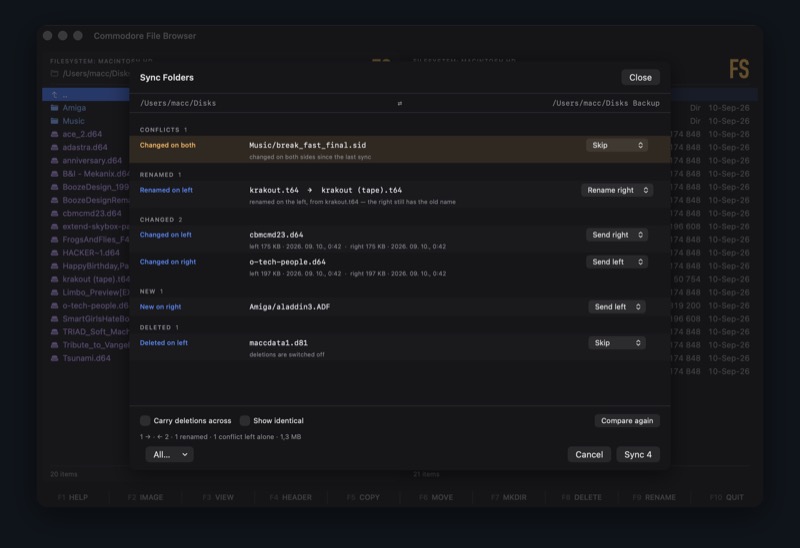
Deletions are off unless you ask for them, and when they do happen they go to the Trash,
whatever the preference for F8 says — that one governs files you picked out
one at a time, these are files the sync decided about. Conflicts are never resolved on their
own: they sort to the top of the report in the alarm colour and their suggested action is to do
nothing. And pressing Sync does not close the sheet. The run happens in front of you, with a bar
weighted by bytes and the name of the file it is on, because on an SD card a few hundred files
take long enough that a frozen window and a dialog vanishing at the end would be
indistinguishable from a hang.
The record is one small JSON file per pair of folders, in Application Support, named after both paths. Nothing is ever written beside your own files — and a record that is missing, damaged or written by an older version reads as no record at all, which costs one careful run rather than a file.
11Dragging, repairing, printing, and the space bar
Drag and drop works in the same four directions the function keys do, and the Finder is
a fifth: a selection dragged out lands wherever it is dropped, and files dragged in from another
application go into the panel they are dropped on. Whether a drop means move or copy is decided
the way the Finder decides it — same volume moves, two volumes copy, ⌥
asks for the other one — with the inside of an image counted as a volume of its own. Which
it has to be, since the bytes are rewritten into the other format on the way across.
Repair Disk is the 1541’s VALIDATE, with a report first. It walks every
file’s block chain, rebuilds the allocation map from what it found, corrects the block
counts that disagree with their own files, and hands back the sectors that were marked allocated
and used by nothing — but it shows all of that before it writes a byte, and like every
other edit it lands in memory, so Esc still throws it away. What it will not do is
guess. Two closed files claiming one sector is damage the allocation map cannot describe, so the
report names the files and nothing is written. Of the 48 disks this was built against, 41 come
out clean; 19 hold an unclosed file, which is usually the whole problem.
⌘P prints what the active panel is showing, and prints it the way the
panel draws it: a Commodore directory goes to paper out of the character ROM, in whichever half
of it the panel is currently in. On screen those glyphs are a bitmap, one image pixel per C64
pixel, because a screen has a pixel grid to line them up with. A printer does not — an
eight pixel glyph would land on fractions of a dot at 600 dpi — so on paper the same glyphs
go down as rectangles and stay square at any size. A Listing pane in the print dialog sets
the size of one character cell and whether the listing runs down the page once or twice: a full
1541 directory of 144 entries fits a single sheet in two columns at 8 points.
Quick Look puts the same readers behind the Finder’s space bar. Pictures become
their own thumbnails, at the shape they were meant to have rather than squared off, so a folder
of ILBMs or Koalas reads as pictures instead of as a wall of blank pages; the space bar on a
tune, a module or a sample says what the file is and starts playing, and stops when the arrow
keys move on. The limit is not the readers but the routing. Quick Look picks a file’s type
off the extension on its name, so an Amiga file called mod.something reaches
nothing at all — and that one is what the browser itself is for, where Return
reads the bytes instead.