Project log · January — August 2025
facelift64.
A complete reimagining of the Commodore 64 and virtually everything that plugs into it: the computer and its keyboard, the 1541/II and 1581 floppy drives, cartridges, a monitor built from an iPad 4 display, a custom-designed power supply — and the cables. Yes, even those.
This page covers the project, the technologies used, and how it all came together.
01The finished system
Before diving into the details and the build process, here's a small gallery of the final result.
02An Amiga-style case
The whole project started when I was looking at my old yellowed, worn-out C64 sitting next to my Amiga 600, and I got the urge to design some sort of Amiga-style case for it. A few months earlier, I'd replaced my old, worn-out beginner 3D printer with a brand new Bambu Lab A1. It printed so much more beautifully than the old one that I thought it might be possible to reach a quality close to factory injection-moulded enclosures. So I started designing, and within about a week (this being a hobby project alongside work and family), I had a printable model: an Amiga-like enclosure for the C64.
Before printing the first actual enclosure element, it's very important to calibrate dimensional accuracy. I learnt this the hard way: I printed the two large pieces of the bottom enclosure from half a kilo of filament over 20 hours, and when I tried to screw in the motherboard, I found that with the screw holes aligned on one side, the furthest hole was off by about 1.5 mm. So I printed a small ruler, measured it, and found a 0.5% deviation. On my printer, with one filament type, elements need to be scaled to 100.5% — with another type it turned out to be 100.2%.
Like the original, this enclosure consists of two main parts: a bottom and a top element. But since the printer can't print at this size, both elements were cut in half and designed to be joined with screws. I rejected gluing — besides being hard to do neatly without visible traces on the outside, I couldn't find an adhesive that bonds PLA strongly enough to withstand mechanical stress (say, grabbing the machine by one side and lifting it). The joint itself is made by sanding the mating surfaces smooth and screwing them together. After that, the bottom and top go together just like the original enclosure: hooked at the back, screwed together at the front from below (with 4 screws instead of 3, for symmetry around the central joint).
03New keycaps
With the enclosure finished, the visual catharsis still wasn't complete: the keyboard was the original one, almost completely yellowed, and the shape of the keys didn't match the case either. So the project called for new keycaps — again with the Amiga as inspiration. I designed all the different keys: the shape changes slightly in each row, there are double- and triple-width keys, and marked ones (F, J). I modelled the underside of the new caps on the original keys, so with the C64 keyboard's frame the new keyboard was complete. Well, almost — it had to be modified a bit to fit the new case: the bottom mounting tab had to come off entirely, and 1 cm had to be trimmed from the right side of the keyboard, PCB included. This is only possible with certain keyboard types — more precisely, with only one of the two types I had available.
04Building in the SD2IEC
Meanwhile, my SD2IEC arrived (a floppy drive emulator that uses SD cards). It didn't really win me over, and it added a pile of extra cables to the existing cable jungle: a USB power cable and a strange DIN↔USB A data cable (USB in appearance only — the wiring is custom). So the challenge was set: build it into the case so the SD card can be changed from outside and the buttons sit in the right place. Since the little device's buttons were mounted on its motherboard, they had to be relocated, so they moved to a small external PCB which, mounted inside the enclosure, gives exactly the button row I wanted. Last but not least, an LED position was needed for visible feedback from the outside.
05A clean-sheet design
That could have been the end of the story if I'd been satisfied with the result — but I wasn't, and fortunately I thought of something completely different in terms of form. It looked very good in my head, so I started designing it to be as small as possible, eliminating all unnecessary bulk. Thus began another complete case design covering everything: every little screw mount, port opening, keyboard mounting point, LED position, joint, fastener, screw hole, ventilation grille. After another 10–12 hours of design, the new version was ready for printing.
Here I'd like to go into detail a bit, because the new form allowed an important change in the printing method that the old one didn't. When you print something that doesn't lie flat on the print bed, it has to be supported — and the supported surfaces of the finished part never look great. On the previous model these fell on the inside, so they weren't visible, but the joint between the bottom and top elements wasn't perfect because of them. The outer surface of that same part was the top of the print, which usually comes out quite nice on the Bambu Lab A1 — but the print lines were still visible. The side of a print that lies against the bed, however, can be as smooth as the plate you print on, and on a smooth plate it's beautifully smooth. So the new model could be designed so that every outward-facing surface lies against that smooth plate, and the internal surfaces are on top during printing — which is both beautiful and, most importantly, precise. The new case is almost silky smooth on the outside, while the inside still gets very high-quality print surfaces.
So I set about designing the new case on this principle. To print it this way, the case had to be broken down further: the bottom and top elements became 2 top and 3 bottom elements, and these had to be halved again to fit on the print bed. In total, 10 elements were printed, which became 5 pieces after joining the pairs — and these screwed together neatly, without any sanding, into the final bottom and top elements. The keyboard frame also had to be printed, because after further modification the original could no longer be mounted; of the original keyboard, only the PCB, the springs, and the key mounting posts remained usable. So the case was finished, I assembled it, and… I didn't like it. The form wasn't right — or rather, the form was right, but not to look at. No matter where the light came from, you couldn't perceive that the surface was tilted, and it looked clunky. I was a bit disheartened, but I still felt this form could work; something was just missing.
06Variations and REV3
I started playing with a few adjustable dimensions, but it still wasn't quite right.
Beyond the dimensions, the next version got a small, minimal shape change — really just tiny details — and shrank a bit more, and finally the version christened REV3 was born, the one I finally felt good looking at. I was satisfied at last. Meanwhile my Megara arrived too, so I installed it along with the SD2IEC, whose buttons got my first custom-designed PCB. The case was finally done: assembled, tested, working. Using the machine like this felt very good — I can't quite explain it. It's like when someone used to replace a bad CRT monitor with a good IPS panel and the blurry, distorted image became sharp, clear and regular. Or when you swap a shabby keyboard for a beautiful new one — it's almost a different machine afterwards.
A big part of that feeling came from the monitor built from an iPad 4 display, showing the C64's picture through a RetroTink2x fed by the C64's S-video signal. The image was stunning. The rasters are as needle-sharp as they were on my old green-and-white monitor's monochrome picture — exactly that "clean" view, but now in colour too (see below).
A particular challenge was integrating the SD2IEC: positioning the buttons and connecting them to the small push buttons on the PCB. The main problem was lack of space — the buttons fall right at the bottom half of the motherboard's left side, where an old socketed IC sits, so the PCB simply wouldn't fit behind the buttons. The solution was a small triangular rocking element that converts sideways button presses into upward pressure, letting me mount the PCB horizontally, higher up, clear of the old IC. This trick would prove useful again later…
07The 1581, compacted
I'm trying to proceed chronologically, so from the C64 we move to the 1581 floppy drive. It wasn't born as simply as I'd imagined — the story of how I never got an original 1581 is embarrassing enough in itself. About 20 years ago I saw one advertised on a Hungarian auction site for 25,000 HUF and thought that was too much (at the time I'd bought a Mac Classic II for 2,500 HUF — and it worked!). A few months later, when I'd accepted that this was the going price, it was already 50,000 minimum, which I again thought was too much. By the time that became acceptable, it was well over 100,000 HUF. I was foolish — so this year I finally decided to build one. I ordered the kit from the worst possible place with the most expensive shipping, and after assembly it didn't really want to work. There's no support either: despite writing to our friend Chris several times, he never dignified me with a response. In the end, the floppy controller IC turned out to be faulty — the kit came with a defective one — but at least the second one I ordered worked, and I finally had a working 1581. First I printed one of the replica cases available online and built it into that, but since I'd really got into enclosure design by then, I got the urge to make a more compact version. Thus was born the facelift64 edition of the 1581 — as compact as it can possibly be. It no longer looks clunky next to the new 64.
08The 1541/II
The 1541/II floppy drive was the next victim. It too was shrunk, ending up centimetres smaller in every direction than the original. With these redesigns I always try to make sure the original internal parts fit the new case without modification — even so, I ran into things like the original LED PCB not fitting anywhere at the front. Fortunately, with this case it could be solved by cutting the small original PCB down. Everything else fits 1:1 — even the EPROM (JiffyDOS) used in place of the original ROM, despite being 1–2 mm taller.
09The iPad 4 monitor
The iPad 4 display is part of this project too, completed around this time (after the C64 and the floppy drives). A year or two earlier, back on my rubbish printer, I'd made a monitor from an iPad 1 display — my first complete case, and it turned out quite badly: neither beautiful nor good. It held the display together with the controller PCB and stood on its legs, even if it wobbled occasionally — at least the display didn't fall off. Later, with the Bambu Lab, I designed a properly thought-out enclosure to replace that rubbish case; it came out much more tasteful and, above all, much more solid, with a leg that can even be adjusted for portrait orientation. Returning to our timeline: a slightly redesigned version of this case became the iPad 4 display's home. Naturally, the controller isn't the same as the previous display's either. That one, incidentally, is an AliExpress miracle. I call it a miracle because when I ordered it, the controller IC's datasheet didn't even list the iPad 4's full resolution among the supported modes — yet when it arrived, it turned out to drive the display beautifully, every single pixel with a life of its own. And the real miracle: this controller accepts 15 kHz VGA signals, so the display is perfect for directly connecting an Amiga (a 600 or 1200, say, with a VGA output) in almost all of its resolutions. I love it.
One more thing about the display: it was made before the facelift64 project, so its design didn't quite match this line — so a new design was made for it as well.
10One power supply for everything
With this many devices finished and in use, another problem surfaced: all those brick power supplies with their long, stiff cables — ugly, and eating up loads of space. What bothered me most is that virtually everything needs its own power source. The C64 has a brick. The floppy drive (one at a time only) ran off a modded Amiga power supply — I needn't say how big that is, and its cable is so stiff I could practically lift the drive by it. The display needs 12V from a separate little plug-in supply. The RetroTink2x Pro expects 5V over micro USB — another little brick. Connect a second floppy drive and I'd need yet another giant brick. In short, I wanted this pile of rubbish in a rather more compact form, so the project's next element became a custom-designed power supply: one unit to power the entire system. Its size limits how many devices can run at once, since you can't put infinite connectors on it. Per the plan, it had to provide 12V and 5V outputs plus connectivity for the C64, the floppy drives and Amigas — which means 12V, 5V, −12V and 9V AC. Since one device couldn't cover all of these, two separate units provide the voltages: a MeanWell RT-65B for the 12V, −12V and 5V, and a small AliExpress no-name transformer for the 9V. The next task: if an Amiga was to run off this supply, all three of its rails (+/−12V, 5V) had to be switchable. I solved it with a 2-circuit relay and a mechanical switch — the switch switches the 5V, the switched 5V drives the relay, and the relay switches the 12V and −12V on its two circuits. And since I have two Amigas, I designed two switchable outputs. The other two outputs are reserved for the C64; those don't need switching, and the 9V is brought out there as well. I used Molex sockets: 2×4 for the C64, 2×3 for the Amigas — with the pin assignment arranged so a 2×3 plug also fits the 2×4 socket and picks up exactly the voltages it needs. The floppy drives draw their power from the same kind of 2×3 sockets.
11Cables
Closely tied to the power supply came the cables — the old, properly grubby ones had to go too. Only the connector housings are printed; the factory equivalents were crude and ugly, and some didn't even exist on the Molex side. I should note that soldering cables is not among my favourite tasks. Quite the opposite!
12Cartridges
As a little finger exercise, I designed enclosures for my two cartridges: an ancient Action Replay MK6 and a recently released KungFuFlash2. For the latter it was almost mandatory — the original printed enclosure didn't meet my visual expectations in any way. And the KungFuFlash lettering… good heavens. It doesn't exactly catch the eye. Something had to be done.
13The mechanical keyboard
One small issue with the keyboard still bothered me: it needed a donor, that donor wasn't usable in its original form, and only one specific type was suitable for the modification. On top of that, staying compatible with all keyboard types would have meant designing several different keycap variants, and I had little appetite for that. Printing keys is tedious enough on its own — nearly 70–80 hours of printing before a full set is done. And the filament for exactly the best colour behaves a bit differently from the others: after the first printed layer, unless I manually helped the extruder (which feeds filament to the nozzle), it tended to jam — and then either the printer beeped or it printed nothing for X hours. In short: printing keys is no fun, and neither is designing them. So I concluded that a really proper solution was needed: a custom-designed mechanical keyboard. Hot-swappable switches, a Shift-Lock circuit (the Cherry switch that behaves like the original hasn't been available for 5–10 years), detachable cabling, and so on. I could get out Sprint Layout again and finally design a proper-sized PCB. I don't understand circuit design, unfortunately, but I found a similar open-source project containing exactly this circuit, so I copied it, redrew it a bit, and it was ready for production: the board christened PROTOTYPE1. The PCB was made by Nyákruház Ltd (happy to give them free advertising), and it turned out beautifully (see photo). For the new PCB I also had to design and print a new frame, which mounts the switches to the PCB and then screws, as a whole, into the enclosure. For the switches, the keycaps had to be redesigned and printed again (hah!). And finally, it was done. Oh yes, one small detail: the Shift-Lock key got a transparent hole filled with PETG, through which the shift-lock LED shines to indicate its state. The electronics work, with one tiny annoying bug: it always switches on, but sometimes it won't switch off. Then you press it another 1-2-3 times and suddenly it's off. Quite annoying — especially if you pressed it by accident in the first place.
14The Bluetooth module
The last project element completed to date is a BT module. On the Megara, the original C64 RF modulator's position is left empty — and the enclosure was designed so that a cover can be popped out of the rear panel at this section: it can be fully closed, have an opening for the RF output if an original C64 motherboard is used, or even host an audio output. I put a small Bluetooth module here, with its button and LED brought out to the rear wall. It works perfectly. What I like most is that I can now listen to the little machine on my BT headphones without cabling any external device to it.
15Project elements at a glance
C64 — Amiga design
- Enclosure: 4 printable elements, PLA (~10h/element)
- Keys: 66 printable elements, PLA, 2 colours (~10h/10 elements)
- Badge: 1 printable element, PLA, 2 colours
C64 — Amiga design — SD2IEC
- Enclosure: 1 modified printable element, PLA
- PCB stand: 1 printable element, PLA
- Buttons: 1 printable element, PLA
- PCB: 1 piece, 2-layer
C64 — REV1, REV2, REV3 design
- Enclosure: 10 printable elements, PLA + PETG support interface (~4h/element)
- Keyboard frame: 1 printable element, PLA
- Keys: unchanged…
- SD2IEC button PCB holder: 1 printable element, PLA
- Buttons: 1 printable element, PLA
C1581 — redesign
- Enclosure: 3 printable elements, PLA + PETG support interface (~5h/element)
- Stand and button: 2 printable elements, PLA
- Badge: 1 printable element, PLA, 2 colours
C1541/II — redesign
- Enclosure: 3 printable elements, PLA + PETG support interface (~5h/element)
- Accessories: 1 printable element, PLA
- Badge: 1 printable element, PLA, 2 colours
Power supply
- PCB: 1 piece, 2-layer
- Enclosure: 2 printable elements, PETG (~5h/element)
- Front panel: 2 printable elements, PLA
Mechanical keyboard
- PCB: 1 piece, 2-layer
- Frame: 1 printable element, PLA (~5h)
- Keys: 66 printable elements, PLA, 2 colours (~10h/10 elements)
Connector enclosures
- Molex 2×3, 2×4 enclosures, PLA
- DIN, mini DIN and square DIN enclosures, PLA
Cartridge enclosures
- Action Replay MK6 + buttons: 2 printable elements, PLA
- KungFuFlash2 + buttons: 2 printable elements, PLA
Bluetooth module
- Rear panel, button, mounting: 3 printable elements, PLA
16Living with the facelift64
In conclusion: the finished C64 — the facelift64 — became a machine I genuinely enjoy switching on and using. Thanks to it, I've started developing and making music on the C64 again. The configuration now looks like this:
- Megara motherboard with original ICs
- Fully integrated SD2IEC with external buttons, SD card slot, and LED
- 2 SID chips (in this config an 8580, with a 6581 as second SID)
- KungFuFlash 2 cartridge, by default as 1MB REU memory expansion
- JiffyDOS kernal ROM
- Bluetooth 5.3 audio module
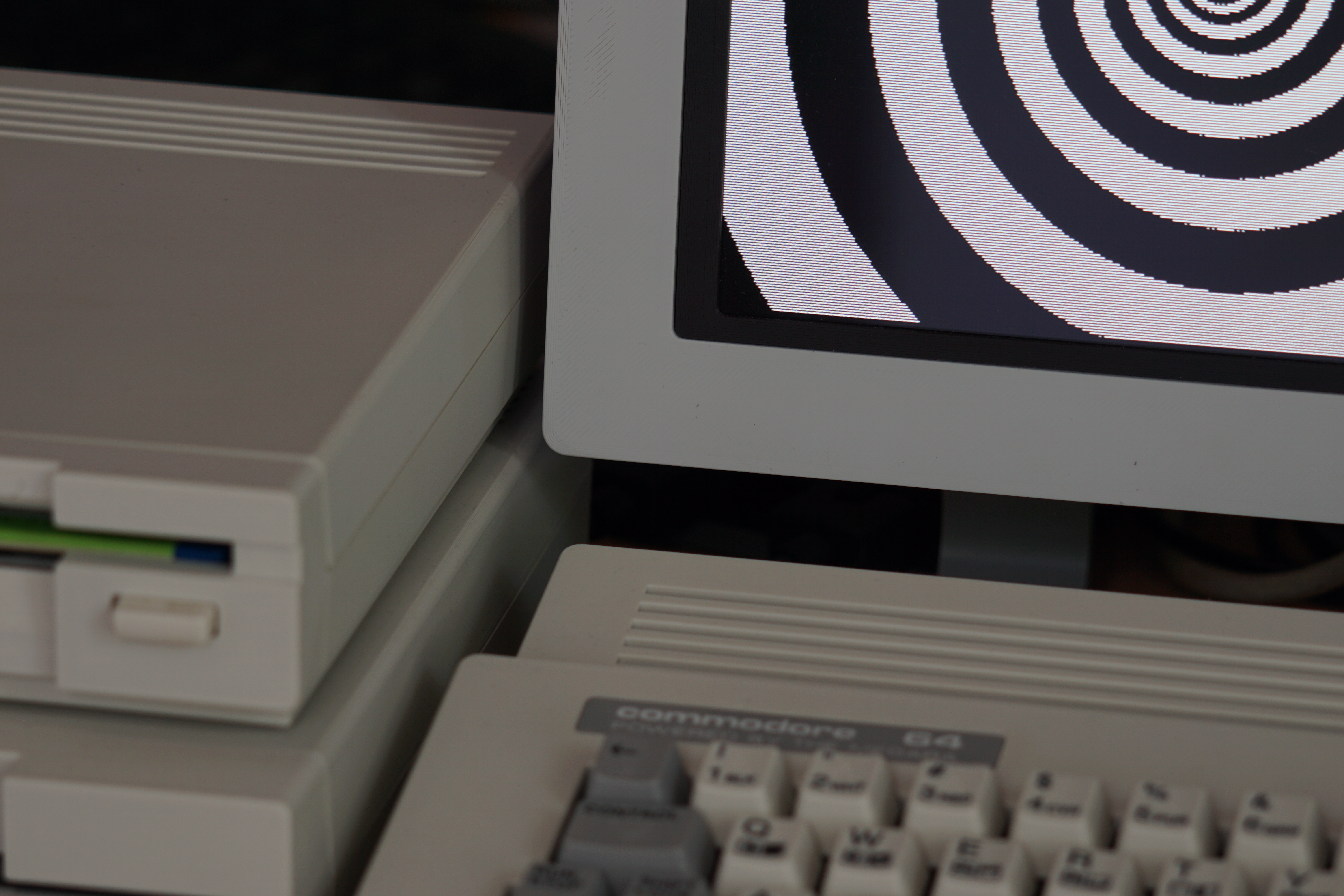
By development I mean: on one hand, I made a full-screen spiral with 284 collapsed side-border raster lines and 68 sprites; on the other, I started writing a file browser for more convenient SD card use — the existing ones simply didn't appeal to me and felt a bit uncomfortable. Mine currently does the following:
- SD card content display, listing folders and files
- Opening files, loading into memory
- List caching for faster navigation
- File sorting by alphabet or size
- Text file display
- SID file playback
There are still a few functions I'd like to implement:
- File copying, renaming, deletion
- Long filename handling
- Image file creation (.d64, .d81)
- File sorting (the default order used by the
LOAD"$",8command)
I've made three pieces of music recently, each a SID reinterpretation of an existing piece. The first was made together with Munu (my daughter, who wonderfully appreciates SID music): a version of Max Richter's Vivaldi/Four Seasons — Summer III. The second is a suddenly inspired arrangement of the Gravity Falls Main & Weirdmageddon themes. The third is an adaptation of Jules Gaia's Break Fast…