20th February 2015
I'll dive straight into the middle of things: about 8 years ago, a colleague at the time got me an old Mac for exactly 2,500 Hungarian forints, specifically a Mac Classic II. Since I've always loved Macintosh computers, I was delighted to discover the old little machine. It had a usable system, booted nicely, although there weren't really any programs for it, but I immediately fell in love with the little black-and-white display. Since I didn't know much about the machine, I was a bit surprised that it couldn't even display grey shades, only black or white pixels. At that moment I was seized by the feeling that it would be good to port my old C64 favourite, Head over Heels, to this machine. The only problem was that I knew virtually nothing about how to go about this...
Several years have passed since then; the machine was gathering dust under a cupboard when I took it out again, and it wouldn't even switch on... Well, it switched on, but there were only a few confused stripes on the screen, and the boot chime didn't even sound. :(
This is when a bit of research work began into what could be done about the situation, and it turned out that in these machines, the aged electrolytic capacitors like to leak. So I ordered new ones, disassembled the machine into its component parts, cleaned it up, desoldered the old capacitors, put new ones in their cleaned places, and lo and behold, it worked beautifully again! Blah-blah-blah, before the whole story becomes too boring, I'll skip over the calvary of the dying old SCSI hard drives; the point is that I now have four five perfectly working old Macs (Mac Classic II, Mac LC, Mac LC III, Mac IIci with its own 13" RGB Apple Display + Mac LC 475), two of which have an AztecMonster SCSI-CF CARD adapter working instead of a hard drive; I use these for development now...
After extensive research, a working installed development environment now runs on the old machines (Metrowerks CodeWarrior 4), I've downloaded all the online available documentation, and what I couldn't download, I ordered (Inside Macintosh Volume IV, V, VI).
I'm currently at the point where my first C64 intro-style program for Mac is complete. I'll make a brief digression here: I learnt to program on the C64, made lots of intros for it, a few rather rubbish demos; the point is that direct hardware coding, economising with RAM, and direct bit manipulation is burnt into my brain. These things are still missing from my current work. That's precisely why on these old machines I'm not particularly interested in creating a windowed program with buttons, lists, slow crackling animations. These are available by the tonne; old Mac games don't really impress me at all (though there are of course 1-2 exceptions, but they didn't impress me with their good visual effects either). Since on the ancient C64 almost every game ran beautifully with buttery smooth animations (50fps), I really missed smooth, fast animations running in sync with the screen. I was almost imagining that you couldn't even do such things on these machines, but as it soon turns out, you can...
You see, on the C64, Amiga, or a Game Boy, we have loads of hardware options for how we manipulate the content displayed on screen; we can shift it bit by bit this way or that, we only need to change a couple of bits in a register, or we can switch between screen modes just as simply, trigger an interrupt at the appropriate raster position, and voilà, the beautiful raster tricks are ready. But on Mac (and now I'm talking about the old Motorola 68k processor series), there's none of this; there's a pile of pixels, a resolution (monitor dependent), and the best we can do is occupy the terrain by bypassing the operating system and scribbling directly into the Video RAM. So anything is possible, as long as the processor calculates fast enough. I'm concentrating on 2 machines now during development: one (the workstation) is a Mac LC III (from 1993, 36 MB RAM, Motorola 68030 25 MHz, 640x480 max. 32 bit/pixel display) and a Mac Classic II (from 1991, 10 MB RAM, Motorola 68030 16 MHz, 512x342 1 bit/pixel), and the first impressions are quite convincing as far as speed is concerned, even though my code is still completely unoptimised, i.e., written in plain C mixed with minimal assembly. By convincing I mean that a half-screen stretch effect runs at 60 fps speed, and I haven't even used half the available resources yet.
The Head over Heels Port Project
The driving force behind all the things I'm doing now is the pursuit of the feasibility of porting the old favourite mentioned in the title. In other words, for the game to be born on Mac (if it's completed, I think it will be one of the platform's best games, which is primarily the merit of the original game's creators), first I need to learn to quickly manipulate pixels on screen, and I can proudly declare that this has happened. This is the result of reading through loads of forgotten documentation, which was preceded by even more online research.
The most problematic thing about the whole thing was that what I want is unconventional from the perspective that direct screen modification is expressly not recommended by most people (for understandable reasons), so very little information is available about these things, and it's about an old, forgotten platform that wasn't the most popular anyway. However, it's very close to my heart, after all, the same heart beats in it as in an Amiga :)
So everything is given; HOH is precisely such a game that doesn't need any special video effects, just a 1-bit screen and some resources, because the C64 did work up quite a sweat with the isometric level rendering. The graphics could easily be extracted from the original game; the resolution difference, however, is a bit perplexing: graphics optimised for 320x200 aren't simple to display on 512x342. At 1:1 it would simply be tiny on the already small (9") display; at 2x resolution (which would be ideal for 640x480) we no longer fit, so I'm currently thinking about 150% magnification, which raises a series of further problems, but I'll deal with that later.
Now I'll jump a bit to the C64 line, because you see, the original of the game I want to port runs on that. In many respects I'm lucky, because the game is about 45 KB, so all information can be extracted with a simple memory snapshot. With a bit of cleverness, you can quickly free the extracted data from the unnecessary, the entry point is also available ($5B03). With a bit of fiddling, the graphic elements were immediately available (at the present moment the blinking and level border aren't there yet), as well as the complete disassembly. I even printed this out in good spirits; it became about 150 pages. It'll be good for taking notes and reading through. The next phase is interpreting the program code, i.e., reverse engineering it. This is a very fun task, and I wouldn't even start it if I didn't know C64 machine code well. But what makes this part interesting is that finding your way around the printed list, especially on an 8000-line assembly program list, isn't simple. To make this easier, I wrote a special C64 emulator...
Custom C64 Emulator
So, I'm sure many similar ones exist; I don't know, I didn't find any, but I needed an emulator with which I could see the entire C64 memory whilst running, track the program's execution, writing/reading, register states, the stack in such a way that from the program's entry point it would be trackable which subroutines the code called, log this, create disassembly with comments (showing exactly what values are moved from where to where). Now this emulator has already helped a lot so far, even though it's barely finished yet. It's helped me understand how the code builds up the details of the isometric space, and which part of the code runs when this is happening, etc.
The Plan
The difficult part of the process is coming now, and this puts me at a crossroads... I have two options: either I sweat blood for a long time and decode the program's operation, or based on what I see and perceive, I write the game.
Obviously neither is simple; the question is whether there's any point in reverse engineering the original code, and if so, to what extent. What can be observed in a game, and what requires precise numerical data to be able to clone? The question is also how much should I stick to the original, and what should be improved?
Since the game is good as it is, it would be best to leave everything as it is, but there are a few things I'd still like to change or have to change:
- Graphics: as I wrote earlier, because of the resolution. A nice colour version would be fun, but primarily the 1-bit graphics should be there.
- Screen refresh rate: originally 12.5 fps (50/4), and sometimes it drops below that if we're moving several things around. The animations are also 2-3 phases accordingly. Now I'd like at least 30 fps (60/2); for this, I'd need to double the animation phases, which isn't simple, but I'll still undertake this.
- Gameplay: now this is what I wouldn't change at all, and this would be the hardest to write exactly like that from nothing (but maybe I'm just seeing ghosts); I trust that reverse engineering this part isn't as problematic as the isometric space rendering.
- Map, rooms: naturally I don't want to change this either, nor play through the game whilst photographing, nor research and regenerate the rooms, so this will also have to be reverse engineered...
- Music, sounds: I love the original, but unfortunately music programming isn't my world. First let the game be ready...
Coding on Mac
After the emulator reached a half-finished state, for a bit of climate change I started coding on the Mac. I was reluctant to make myself do it, since it was a completely foreign environment. On one hand, I'd never programmed in C. I'd read lots of source code before, modified a few things on some, but I'd never written a C program, especially not from scratch. Fortunately, however, CodeWarrior 4 running on Mac has proved completely stable so far (I'd struggled with MPW for a while earlier, but fortunately it crashed a lot, because CW is better and generates smaller code*), so I reached the level relatively quickly where I could start an app from the OS, write directly and undisturbedly to the screen, use VBL (Vertical Blanking Interrupt) for smooth animations, and exit the program nicely back to the system. The result of this testing was a little intro (which I mentioned earlier), with a scroller and a waving "logo" or let's call it whatever we want... * For some reason I like to know about every byte in my programs (where this is possible), and it particularly bothers me if there's code in there that I never even run.
4th March 2015
A little time has passed since the last sentence; meanwhile, a few things belonging to the project have been created. Continuing the Mac coding, the 2nd Mac Intro was also born, in which I managed to move slightly larger graphics on screen quite fast (not so great on Mac Classic), and a DYCP scroller was also made. See in the pictures, JS demo...
Code Reverse Engineering II.
The code reverse engineering got a big boost when, with the help of a simple script, all routines got a call list, code and data blocks were separated and I numbered them, and with another little script I also listed all the program's variables, highlighting the location and method of their access; the latter became a 5000-line list, to be imagined roughly like this:
       7743 - STA $5B2C        ; writing back to $5b2c.
       a60a - LDA $5B2C
       a60f - STA $5B2C
5B2D:  796d - LDA $5B2D
5B2E:  5c1f - LDA $5B2E        ;waits for 4th frame... (or rather nullifies after 4 frames)
       5c26 - STA $5B2E
       95f9 - DEC $5B2E        ; decrement $5b2e, the frame counter
       95fe - INC $5B2E        ; if it went negative, back to 0

; CODE block 3 ---------------------------------------------
5C6F:  5c54 - STA $5C6F
5C73:  5c4e - STA $5C73

; DATA block 4 ---------------------------------------------
5CE2:  5ccc - LDX $5CE2
5CE3:  5ccf - LDY $5CE3
5CE4:  5cd5 - LDX $5CE4
5CE5:  5cd8 - LDY $5CE5
Interpretation of the previous code segment: Variable address: reference address - code that references the variable (writes and/or reads it).
Compiling the routines' call list simply happens by finding every JSR, JMP and Bcc instruction in the code and seeing where it points. At the pointed address we record where we jumped from. Running through the entire code, the result is a long list in which after every referenced address there's a row of addresses from where we referenced it. In the code I put the reference location in brackets before the referenced code section: [JMP] (JSR) {Bcc}
; CODE block 32 ---------------------------------------------
[7846, 8af1]				; JMP reference
(7bea, 7d9a, 8685, 8a82, 8ac4)		; JSR reference
.C:84d0  8D AF 84    STA $84AF		; subroutine code
.C:84d3  0A          ASL A
.C:84d4  0A          ASL A
.C:84d5  6D CE 84    ADC $84CE
There are also indirect jumps in the code, as well as jump instructions rewritten with values taken from tables; I'll only be able to uncover these after more thorough analysis of the code, but you see, this is a big jigsaw puzzle...
Collecting the variables (let's call them that) happens in a similar way, i.e., we look through the code and collect every memory address that the code writes to/reads from, and as an extra we record where this happened in the code and with what instruction. Here again a blind spot remains, namely the indirect variables filled from tables; their exact operational area (the memory area called variable) will remain a mystery for a while. The created list is very useful; on one hand it's transparent where and what the program does with which variable, you can also see how intensively used a variable is, furthermore, it also makes finding constants easier (which we never write anywhere, only read their value). All this information brings us closer to understanding the program. Just for interest's sake, I'd mention that the game uses 952 variables, furthermore 693 subroutine calls, 304 branches, and 1274 conditional branches, all this in 12299 lines of code...
Apple Macintosh LC475
9th March 2015
Meanwhile I got my new Mac too, an LC 475. This is the strongest member of the pizza-box-shaped LC series. At the same 25 MHz clock speed, it's on average 3x faster in everything than the LC III, except for floating-point calculations, since currently there's an M68LC040 processor in the machine, which lacks the integrated FPU. The full processor, from which nothing is missing, is already on its way from Germany. I'd note here that this processor, together with its successor (68060), I think are the most beautiful processors ever made.

Now my direct VRAM manipulation plans seem to be falling apart a bit. On one hand I like that what I write to memory immediately appears on screen; on the other hand, since the LC475 handles video memory completely differently, the question arises whether it's worth optimising the code for so many different architectures? Since Head over Heels doesn't require extremely fast VRAM manipulation, the answer is clearly NO. I'll rather keep this technique for writing intros and demo effects. So I'm much better off choosing system-compatible screen handling (Offscreen GWorld); I don't lose much in speed, and the Mac Classic can probably handle the animations in the game with plenty to spare. Full stop.
Isometric Level Rendering
17th March 2015
However entertaining C64 code reverse engineering is, I had to realise that reproducing the game this way would be too lengthy. Of course it's a good feeling when after a few hours of research I decode 1-2 algorithms and a few foggy details clear up, but extracting the understanding of such a complex code that stores/renders an isometric level from the fog of the unknown would be quite time-consuming, and in the long term my work would suffer.
Therefore (and seeing Krissz's work and efficiency) I chose perhaps the more traditional method of game rewriting: watch and program :) So first I wanted to solve the problem I judged most mysterious, namely isometric level rendering. I'm sure solutions exist for this in many places, so I tried to find some usable information on the net, but even the most detailed description didn't touch on the details I found questionable. I mainly read only about flat, i.e., 2-dimensional tile-based level mapping, which can be solved completely simply with 2 nested for loops. But when a body moves in the vertical direction, the for loops fail.
After two days of head-scratching, I got the solution, and afterwards I'm very glad I didn't find someone else's solution, because it always feels much better when you figure out the secret yourself. The solution is painfully simple: the nested for loops that call the rendering function of the current element don't even need to be touched. You only need to change the rendering routine a bit so that if there's a not-yet-rendered element behind the element to be drawn, then we render that first, and so on. I'll try to detail the problem and solution visually as well.
With the isometric view, we can display 3D space with simple 2D technology, or we can display simple 2D game space in quasi-3D. The beauty of the thing is its simplicity. We transform a simple 2D tile-based game space to isometric like this:
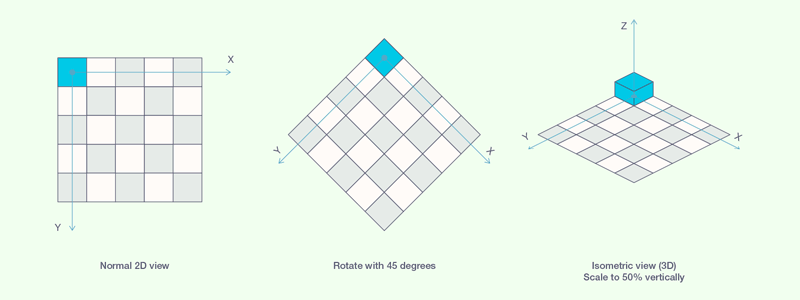
In isometric space, our simple 2D top-view level becomes 3D-looking. If we stack elements on top of each other, we can create real 3D space, for displaying which the isometric view is perfectly suitable:
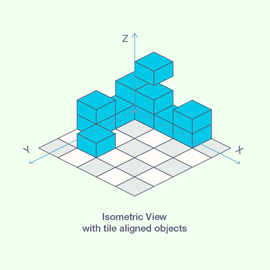
As long as every element is aligned to the grid, rendering is dead simple too; you just need to go from back to front and from bottom to top with the drawing. So for example, 3 nested for loops do the job nicely. But if we want to see nice continuous animation during movement, we can't jump from one point to another, but must take the path between two grid points in several steps, where the previous method already fails:
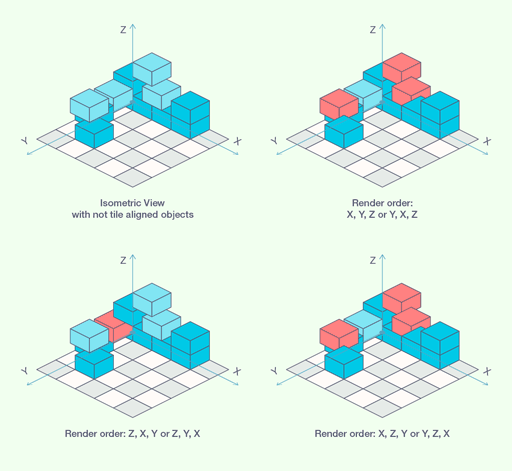
To be able to render elements in every position and combination, all we need is that before drawing any object, we check whether there's an element behind it that isn't drawn on screen yet; if there is, then we need to put that one out first. To simplify overlap checking and ensure rendering actually proceeds approaching the camera, I rearranged the coordinate system a bit: isoX and isoY are basically screen coordinates, whilst isoZ indicates distance from the screen (in our example, the larger isoZ is, the closer it is to us).
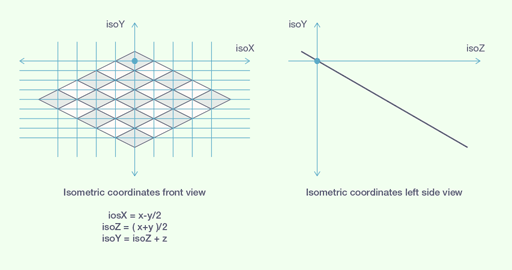
Calculating in the new coordinate system, we sort our objects to be drawn in ascending order based on Z,Y,X coordinates. Thus the first element in the list will be the furthest, lowest element: a perfect starting point. We only need one loop (because of the previous sorting) which goes through the elements list and calls the rendering function to draw the given element. Before drawing the element, the rendering function checks whether there's an element in its coverage that might not be drawn yet, and if yes, it calls itself to draw the new element first (and since the function is recursive, it also checks for the new element whether there's something behind it, and so on...).
I'm over the difficult part of isometric level rendering (at least it feels good to think so); now all that's needed are such trifles as rendering floors, walls, doors. Then after that can come movement and animation. But that won't be today...
Graphics Remake 1.
21st March 2015
Now I'm certain it'll only be 2x resolution! Unfortunately it'll be a bit big at 512x342 resolution, but because of the movements and animation timing, it would require unrealistic extra work if I also had to do it at 150% size... Buoyed by this, I completed the walls remake, see below - Hovering the mouse over the image, the original emerges.
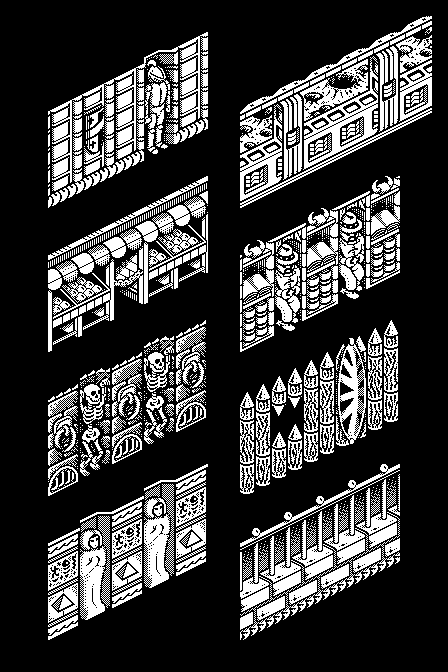
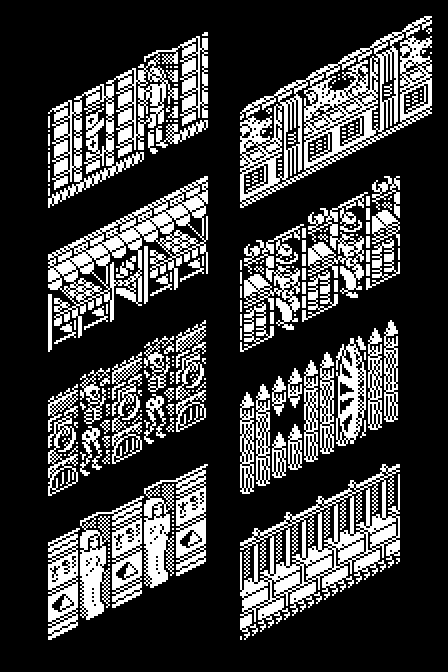
My endeavour to reproduce the original game with the least possible modifications is getting more and more chipped: first I tried to scale up the graphics so they'd remain almost identical to the original, I only wanted to smooth the curves and diagonal lines. The result was quite disappointing: the lines were too thick, and my eye missed the details expected from the resolution. Moreover, I was forced to detail certain elements, which clashed very much with parts made with the earlier technique. So instead I started consistently thinning certain lines and adding some pixel ornament.
During pixelling I constantly switched between the original and new versions and tried to work so that squinting, the change would be almost imperceptible. At least something like that... I often tried adding or deleting 1 pixel so that the given detail would be distinguishable and positioned well in space. However unbelievable, a single pixel can have very great significance; if it's in the wrong place, it can easily happen that a curve breaks, a face changes, or just a length changes. I have great respect for Bernie Drummond, who achieved the graphics from a quarter as many pixels; there the aforementioned effects are exponentially valid.
I also had the dream that the game being made would, true to the original, also be the smallest possible executable file. In other words, let the file size be small. The original, even uncompressed, is only 48 KB. Now this won't succeed for many reasons. Right off we double the resolution, which immediately means four times growth in graphic data. If I also want to expand the animations, that's more data again. Added to this is also the fact that the original game, out of necessity (because there wasn't more available RAM, and they stuck to 1 file, for which I bless them), applied solutions where they only stored 2 versions of objects facing 4 directions and mirrored the figure at runtime if needed. This also saved lots of memory and file size. The same is true for wall elements, doors... Now on an 8-bit processor, with a neat method, they generated a 256-element translation table, so reading a byte of graphics and using that as an index on this table, they got the 8-pixel mirror image. This is a pain on a 68k processor because byte operations waste lots of time, the graphics consist of 4x as many bytes. I'd also find a 16-bit, 64 KB translation table unpleasant, so 2 possibilities seem reasonable: I store the mirror images of graphics too, or I perform the slow byte-based mirroring at program start. The latter doesn't reduce the program's memory requirement, but at least the file size is smaller; after all, that's what I wanted... The point is that I don't mirror at runtime because it would slow down the game very much!
A few words about why 150% graphics magnification isn't good: the original game's pixel sizes and speed are in perfect harmony with the screen resolution. On screen, any point of a unit area is 16 pixels horizontally and 8 pixels vertically from the same point of an adjacent area. The spatial vertical unit is 12 pixels high. From this it follows that the original game takes(can take) unit distance in 8 steps on a plane and 6 steps vertically, all this at 12.5 fps speed (at 50 Hz screen refresh, there was movement every fourth frame). If we double the resolution, everything can be perfectly reproduced; we just double the pixel movements. If I want to refine the movements, then if I animate every second frame, that's also possible, since at double resolution I can halve the step distances. So in the original game, during 1 phase of movement I step 2 pixels in X direction and 1 pixel in Y direction; at double resolution this is 4 and 2 pixels, so I can halve them to increase the frames per second. At graphics magnified 150%, the basic units change to 24, 12 and 18 pixels. It's difficult to cover these distances in 8 equal steps. If only the goal were for whatever moves to cover 1 unit distance in the same time, it could be solved by modifying the fps, but then our animations' speed would change. So it's solvable, but at the cost of lots of modifications and extra work. "I don't need this dog; it's mocking me."
HOH Render Engine
1st April 2015
The last ten days turned out quite eventful: first I roughly designed the renderer and the complete game logic, then when the last questionable detail was also solved, I started programming. First I rewrote the previous isometric object renderer a bit; the coordinate system changed slightly so that certain game functions like connected rooms would be easier to implement. Then came the rest: floor, walls, doors. Although it might seem trivial compared to rendering isometric space from arbitrary elements, it still became at least 2x as long in code. To demonstrate this, here's this little playroom:
door
door
door
door
size
size
What we see here is basically a background (except of course the doors), which the renderer assembles from 32-pixel-wide columns in 2 passes. One goes along the north wall (top left) and includes the vertically below floor and border detail, the other goes along the east wall in a similar manner. The rendering is twisted a bit by the fact that the renderer assembles the image from a maximum of 128x128 pixel squares. This "viewPort" method (as the original game also works) is important because later, when small elements move and animate in the game, these need to be solved by refreshing the smallest possible detail of the screen. In a browser, with javascript, you could simply draw the entire screen every refresh, but the goal is still the Mac Classic, where we don't have resources to spare. The JS-based version, which I'll also finish, is basically a prototype based on which I'll then make the C + ASM version. This of course will also be visible in the javascript code, since many program parts are made based on the characteristics of the final target platform. At the same time, there are also details, typically in variable storage, where I didn't want to bother with saving the last bits in javascript; it'll be enough to play with these in CodeWarrior.
The next phase will now be finishing the renderer by adding functions like copying texts and graphics to screen, after which the menu system can be completed, and scoring/lives/etc. during the game (OSD as On Screen Display).
Although it doesn't show so much in the previous little demo, the essence of the renderer is ready and works very well (I don't dare write perfect; I've already noticed 1 small bug in the demo, and I still need to test movement in a furnished room) it's capable of displaying all possible room floor plans in all graphic themes, capable of displaying any legal furnishing, and displaying moving elements anywhere in it so that the appropriate elements are always in occlusion. By legal I mean that every element must be positioned so it doesn't stick into other objects. During the game, collision detection will take care of this.
Progress Report
20th April 2015
In the nearly three weeks that have passed, lots has happened; among other things, 90% of the graphics are complete, only the animations are left. After getting tired of about 10 days of continuous pixel drawing, I got to work on the next phase as announced—finishing the renderer—that was quickly completed, it wasn't a complex task, the essence was already there before. After this, I started coding the game's menu system, and I'm happy to report that this was also completed last night. The program is being made optimised for 640x480 and 512x342 resolutions; I also set up the menu so it would be usable on these two resolutions. Apart from colours, it became practically identical to the original: http://iparigrafika.hu/hoh_proto/menu/
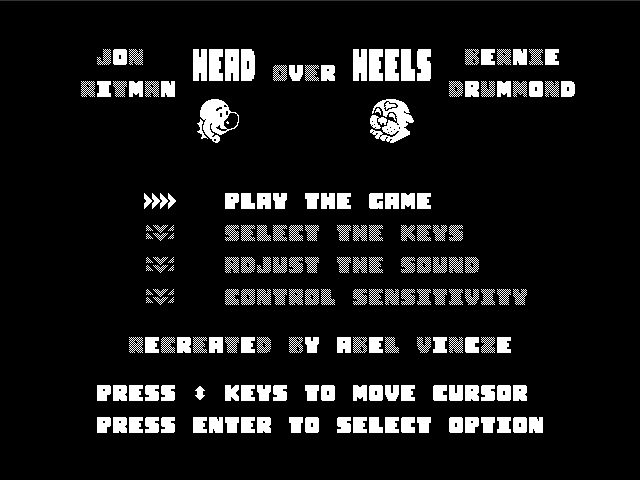
Essentially "only" the gameplay remains, and this feels quite good, since I've completed all those frills that I usually leave to the end in other cases. So the gameplay: player control, switching between players, the levels, storing their data, moving enemies. These will be the main characters of the next wave. I'd note here that when I've finished all this, then comes the essence, since what I've talked about so far is the Javascript version of the game, which by itself won't run on Mac 68k platform yet, so after this begins a tough stint: recreating the whole thing in C.
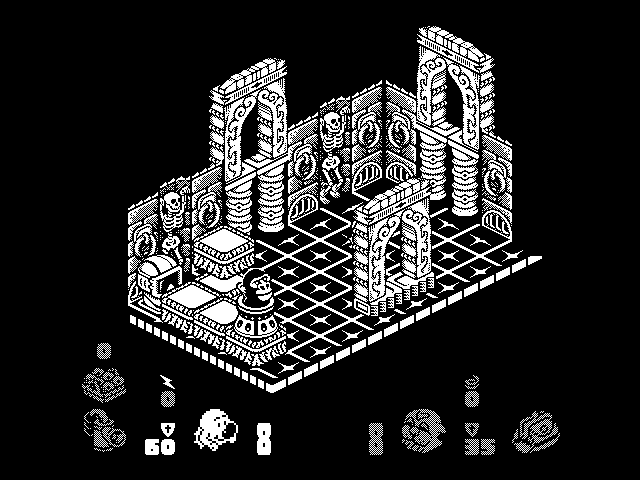
Progress Report Again
24th September 2017
Surprisingly much time has passed since the last update, but nothing has stopped, quite the opposite :)
I previously explained how important I consider small file size, so at the beginning of this year, I started dealing a bit with data compression. I'd like to write about it in more detail, but I tried and it went rather badly: http://iparigrafika.hu/retrocomputing/packer/ (I'd quietly mention that the current version already compresses better; there's no file among the test graphics where zip would win). Anyway, I finally managed to put together a compression algorithm that's very efficient for my small-size 1-bit pixel graphics (specifically beats zip) and decompression is also quite fast (188-byte 68k assembly code; I'd like to write about making this too). So the file size won't be too big because of graphics, if it becomes too big.
At the beginning of the year I also made a little something for the old machines; this isn't really connected to anything, just fun (unfortunately youtube compressed it to bits; I'll solve this or not):
I also started dealing with animations; I'm at about 50% with them.
I also pondered the sounds a lot. I could roughly imagine 2 solutions: One would work with samples and I'd need to write a mod player (True, I have a source for it, but I haven't managed to compile it under CodeWarrior yet). The other solution would be writing a SID emulator (only the sound chip emulation would be needed because it wouldn't be the original C64 code playing the music and sound effects). The latter solution is more appealing because it could be realised in much smaller size than with sound samples, and anyway I really love the original game's sounds; it would be good to play accompanied by those. The disadvantage of the latter is that I haven't even come close to how I could emulate the SID chip. But like everything so far, this will also be solved somehow; I'm optimistic!
UPDATE: In the elapsed time, lots has progressed on other fronts too. I'm also further along in code reverse engineering; all graphic details have been there for ages (like blinking and level borders), furthermore level data is also available, although I've only been able to partially reverse engineer the code that creates levels from data...
Sound and SID Matters
30th December 2017
I still haven't decided how to implement sounds in the final game, but I've made progress with the basics. After a bit of searching, I found Hermit's wonderful jsSID player; as its name suggests, it's written in javascript and runs in browsers. On one hand this already helped a lot in mapping possibilities, but we started corresponding, and I got lots of technical help from Hermit regarding SID emulation. If there's already an emulator for the SID, that's very good; I'd later port this to 68k assembly. The next step was that I reverse engineered the original C64 music and music player routine—surprisingly neat it went; I had it in about 2-3 days. From this I made a javascript player routine (originally there were lots of pointers to direct memory addresses in the musical data, so I had to dismantle that too, rewrite the pointers, and restructure it a bit for fun): http://iparigrafika.hu/emu/hoh_sconv/hoh_jsplayer.html.
There's a music player, there's a SID emulator. Now I should make ports of these too for the target platform (68k Mac), but meanwhile I feel it's a bit dicey on 68030@16 MHz, such that besides this I also need to run game logic and graphics display, i.e., the complete game. So I keep trying to find alternatives, and at times like this even the most impossible things come to mind, for example what it would be like if I could somehow connect the SID to the old Mac. Since I'd recently spent a few hours with Arduino, connecting seemed an obvious solution, so I started researching SIDshields; I found two (RealSIDShield, SID-Shield for Arduino), which seemed quite good, but they were only enthusiastic attempts; you couldn't order them. Both were good solutions, but somehow they didn't suit me. It bothered me that communication between the SID and Arduino was solved with an extra IC. I'd most like to leave even the Arduino out of the equation, but that makes sense if I plan to connect the contraption to multiple types of computers. So some machine -> serial connection -> Arduino -> SID. In other words, the Arduino UNO would need to (because that's what I happen to have) directly drive the SID. Finally I managed to find a good example for this too: http://www.deblauweschicht.nl/tinkering/mos6581_1.html. After minimal modification to the circuit and using completely new code, the miracle below was born:
A Bit More Detail About How It Works
For operation, the SID needs the following: +5V, +9V (SID 8580) or +12V (SID 6581). It also needs a 1 MHz signal (phi2), which is essential for its internal operation. It needs a Reset (RES) signal. It needs 5 address and 8 data lines. It also needs to be told whether we want to write or read (R/W), and also when the input data is ready (CS) (address and data for writing or reading).
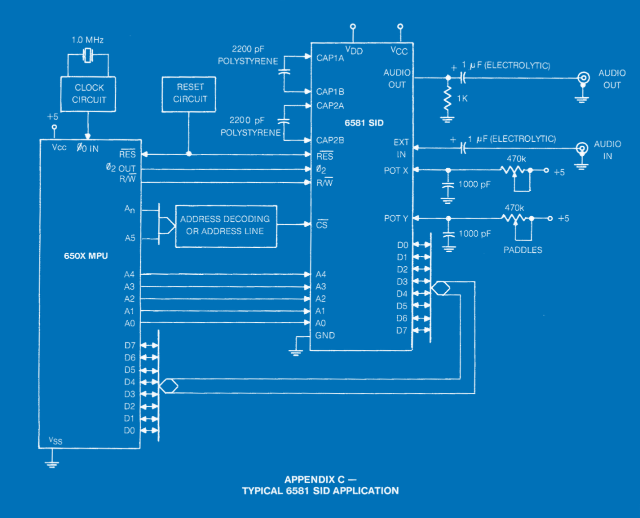
I connected the SID to the Arduino with the following (pin-leg) assignment:
Arduino  SID        Arduino  SID
5V_______25 (Vcc)   D2_______15 (D0)
GND______14 (GND)   D3_______16 (D1)
Vin______28 (Vdd)   D4_______17 (D2)
                    D5_______18 (D3)
A0_______ 9 (A0)    D6_______19 (D4)
A1_______10 (A1)    D7_______20 (D5)
A2_______11 (A2)    D8_______21 (D6)
A3_______12 (A3)    D9 pwm___ 6 (Phi2)
A4_______13 (A4)    D10______22 (D7)
A5_______ 5 (RES)   D11______ 8 (CS)
                    D12______ 7 (RW)
I use the Arduino's Vin output as 9V, so it's important not to get power from USB but from a 9V power supply connected to the power socket. The Arduino doesn't regulate this voltage, so definitely measure it before it could reach the SID!
Since I'm "working" with SID 8580, I changed the capacitors connected to CAP1 and CAP2 to 22000pF (22nF), and I don't use the 1K resistor at the audio output; that's only needed for the 6581. The entire audio output is different from what's shown in the diagram above; I made that based on the original C64 circuit diagram, see below. I placed 1 .1uF ceramic capacitor each near the power inputs, and 1000pF ones for the unused analogue inputs.
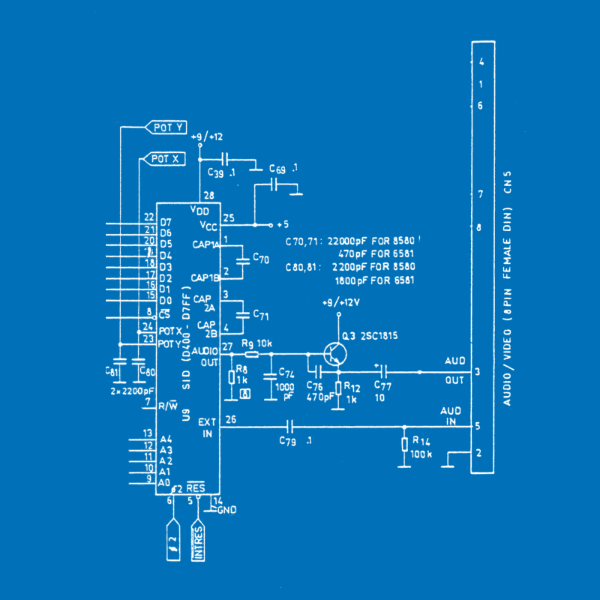
The address (A0-A4), data bus (D0-D7), RES, R/W and CS roles are fulfilled by one digital output each from the Arduino. We can also easily generate the 1 MHz signal on one of the PWM digital outputs. So all we need to do is toggle the appropriate digital outputs at the appropriate time.
Briefly about the code: no external lib needed, simple as pie, and quite fast.
#define pSID_RES  A5    // Reset
#define pSID_PHI2 9     // 1 MHz
#define pSID_CS   11    // Chip Select
#define pSID_RW   12    // Read/Write

#define pSID_D0   2     // Data
#define pSID_D1   3
#define pSID_D2   4
#define pSID_D3   5
#define pSID_D4   6
#define pSID_D5   7
#define pSID_D6   8
#define pSID_D7   10

#define pSID_A0   A0    // Address
#define pSID_A1   A1
#define pSID_A2   A2
#define pSID_A3   A3
#define pSID_A4   A4
After dutifully defining the used pins, we set them all to output, since we don't wish to read (at least I don't).
pinMode(pSID_RES, OUTPUT);
pinMode(pSID_PHI2, OUTPUT);
pinMode(pSID_CS, OUTPUT);
pinMode(pSID_RW, OUTPUT);

pinMode(pSID_D0, OUTPUT);
pinMode(pSID_D1, OUTPUT);
pinMode(pSID_D2, OUTPUT);
pinMode(pSID_D3, OUTPUT);
pinMode(pSID_D4, OUTPUT);
pinMode(pSID_D5, OUTPUT);
pinMode(pSID_D6, OUTPUT);
pinMode(pSID_D7, OUTPUT);

pinMode(pSID_A0, OUTPUT);
pinMode(pSID_A1, OUTPUT);
pinMode(pSID_A2, OUTPUT);
pinMode(pSID_A3, OUTPUT);
pinMode(pSID_A4, OUTPUT);
Generating the 1 MHz signal on Arduino UNO, which ticks at 16 MHz:
TCNT0  =  0;                        // Reset timer
TCCR1A =  _BV(COM1A0);              // Set PORTB1 to toggle on OC1B compare match
TCCR1B =  _BV(WGM12);               // CTC mode, OCR1A as TOP
OCR1B  =  0b0000000;
OCR1A  =  0b0000111;                // Set counter TOP to 8-1 = 7. For a 16MHz. clock this = 1 Mhz.
TCCR1B |= _BV(CS10);                // set prescale to div 1 and start the timer
At the end of initialisation we set the CS and RW signals and send a reset signal to the SID:
digitalWrite(pSID_CS, HIGH);        // Set SID Chip Select HIGH (idle)
digitalWrite(pSID_RW, LOW);         // Set SID R/W LOW (Write)
digitalWrite(pSID_RES, LOW);        // Set SID RESET LOW (reset)
delayMicroseconds( 200 );           // Wait a bit...
digitalWrite(pSID_RES, HIGH);       // Set SID RESET HIGH
Now all we need to do is write the SID registers from code, and it will behave the same as under C64. To make this easier, here are a few helper functions:
void setData( byte data ) {
  digitalWrite(pSID_D0, data&0x01 );
  digitalWrite(pSID_D1, data&0x02 );
  digitalWrite(pSID_D2, data&0x04 );
  digitalWrite(pSID_D3, data&0x08 );
  digitalWrite(pSID_D4, data&0x10 );
  digitalWrite(pSID_D5, data&0x20 );
  digitalWrite(pSID_D6, data&0x40 );
  digitalWrite(pSID_D7, data&0x80 );
}
void setAddr( byte addr ) {
  digitalWrite(pSID_A0, addr&0x01 );
  digitalWrite(pSID_A1, addr&0x02 );
  digitalWrite(pSID_A2, addr&0x04 );
  digitalWrite(pSID_A3, addr&0x08 );
  digitalWrite(pSID_A4, addr&0x10 );
}
void writeSID( byte reg, byte val ) {
  setAddr( reg );                   // set addr pins
  setData( val );                   // set data pins
  digitalWrite(pSID_CS, LOW);       // data and addr ready, set CS LOW: data/addr read by SID
  digitalWrite(pSID_CS, HIGH);      // and set CS HIGH again...
}
void resetSID() {
  for( byte i=0; i<25; i++ ) writeSID( i, 0 );
}
The complete Arduino sketch with Head over Heels music is downloadable here. As a comment, let me mention that I store a variable in EEPROM which I increment by one after every restart: this is the number of the subtune it plays. There are 14 in total. There was also a version where I controlled 3 LEDs based on the state of the 3 sound channels' GATE bits...
I'd add, however, that SID reset isn't 100%; it doesn't reset properly in every case, as a result of which the ADSR is "inactive", the envelope generator doesn't work, and every sound immediately sounds at full volume when the gate bit is switched on. When I figure out why it does this, I'll update the article.
Mini Demo for Mac Classic
18th September 2020
It's been so long since I wrote that I'm almost embarrassed to continue, but now I'll get over this: so last year during the big Christmas break, a small dream of mine finally came true—I ported a waving scroller effect that I'd originally written in javascript to Mac, 100% Assembly code the whole thing, and at my level it became quite a complex little 16 KB program.
The starting point, with the effect written in Javascript, the first problem was that the wave curve was done by the code with loads of sin/cos calculations, multiplications, divisions, and quite a lot of these were needed, and every frame, before drawing, this had to be calculated. The second problem was that it rotated characters at runtime (calculated the pixels), which meant 4096x(sin/cos/division/multiplication/square root/etc.) per rotated character. Neither of these is portable to a 16 MHz machine if I want to maintain vsync.
It occurred to me to nicely precalculate the rotated characters and go with that... But the 720 KB data amount for such a scroller on such an old machine seems ridiculous to me, who anyway always strives for the smallest possible file size. What remained was the solution of rotating in M68k assembly. For this I had to figure out a procedure that worked with smaller, precalculated value-containing tables. The original rotation routine goes through the (64x64px) 4096 pixels, calculates the distance from the centre (in pixels), determines the angle of the pointing vector, adds the rotation amount to this, calculates the source point location from the new angle and distance: whatever pixel it finds there on the unrotated character becomes the pixel at the given position (from where we started). This was simplified by using 3 precalculated tables: the first contains the distance of points from the centre, the second their angle, the third, based on the angle, multiplied by the distance, gives the rotated pixel position. All the tables and graphic data used by the program are stored compressed to 10 KB (MPackerX which developed from the little javascript prototype into an app became a commandline tool for Mac OS and Linux, as well as a Swift-ported Mac OS version with GUI), the remaining 6 KB is the assembly code, in which some extras remained if I remember correctly (e.g., a custom PRINTF implementation, true that's about 200 bytes, a debug font).
; RSRC     packed/unpacked    filename
; $80         476     2688    16x14_terminalfont_LR2.pkx
; $81         164     1116    apple_logo_96x93_LR2.pkx
; $82        1700    16896    64x48_funnyscrollfont.pkx
; $83        2560     8192    rotTA_NR2.pkx
; $84         564     2048    rotTRS_NR8.pkx
; $85        3174     8192    rotTR_.pkx
; $86         322     1024    distsc.pkx
; $87        1714     2434    sin_sina_mul_dirs_NR2.pkx
;-------------------------
;           10674    42590
Another interesting thing is the rendering (now I skipped the wave curve calculation, though that's also interesting), because true we only draw 13 characters, but they can be anywhere from the top to the bottom of the screen. And since we need not only to draw but also to erase (since we draw with EOR, the same routine does both), that's rather 26 characters. So we go through the characters in order sorted by their Y position and draw (wasn't interesting in retrospect after all...).
Developing the gameplay
29th September 2026
After six quiet years the biggest missing piece is finally in place: the gameplay. The menu, the graphics, the renderer and the sound (on the CSID_light SID emulator by Hermit, Horváth Mihály) had been there for a long time, but controlling the characters, the objects, the enemies and the logic of the rooms had not. This time I had Claude Opus 5.5 do it, much like Back to the PET: I gave the direction, the rules and the decisions, and it did the reverse engineering and the code of the gameplay — all built on the existing remake.
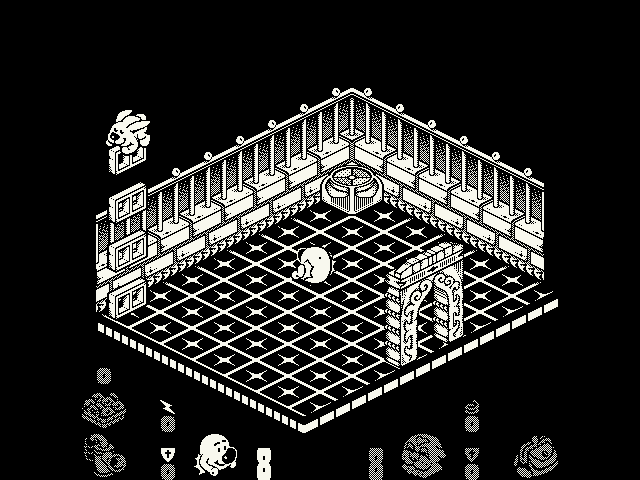
The key was something I had missed before: the C64 Head over Heels is a routine-by-routine translation of the ZX Spectrum original. The same 18 byte object record, the same tables, the same logic. And there is a public, commented disassembly of the Spectrum version, so that served as the map and the C64 listing as the referee: the whole gameplay code of the two was compared instruction by instruction. Where the C64 port differs from the Spectrum one, the remake follows the C64: no jump sound, no blip on landing, the C64's own (slightly buggy) random number generator, and the C64 timing in the victory room. The level data of all 301 rooms was also checked against the native C64 level data: every room matches.
The code is plain C, with structs and no classes, because the final goal is still the 68k assembly version for the old Macs, and this way it can be translated almost line by line. The screen is a 640x480, 1 bit bitmap where only the changed areas are redrawn — just like the original does it, and just like it will have to on an old Mac.
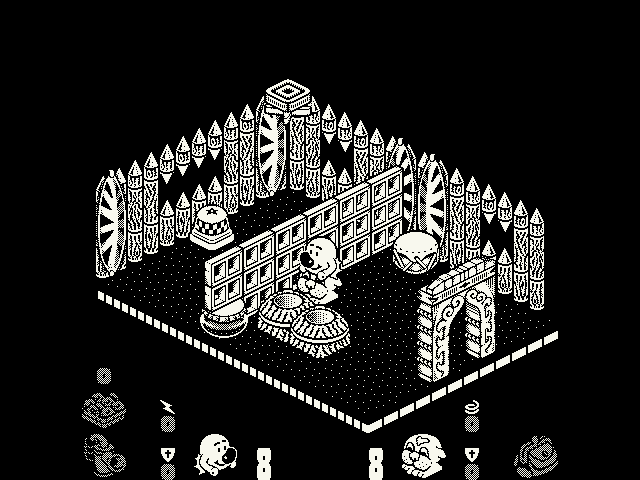
30 frames per second
The original game takes a step every fourth frame on a 50 Hz machine, so it runs at 12.5 fps. In the remake every step is split into two half steps (with doubled coordinates), so it runs at 30 fps (60 Hz), and this is where the in-between animation frames drawn back in 2015 came in handy. The paths and the timing stayed the same: they were compared step by step with the 12.5 fps version. The speed is that of an NTSC C64 (20% faster than PAL); 25 fps, exactly the PAL speed, is a build option.
Most of the testing was done by a built-in test harness: the program plays without a screen from scripted key presses, saves screenshots, and prints the state of the characters at every step. A random play test plays a little in each of the 301 rooms while checking that the object lists stay intact — it caught several bugs I would probably never have noticed by playing.
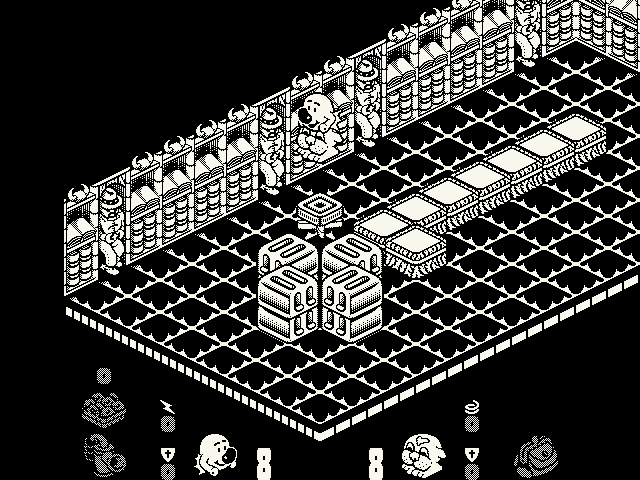
What the original doesn't have
- Game controllers (PS5, PS4, Xbox, ...) and joysticks, together with the keyboard.
- A trainer mode: type TRAINER in the menu, and lives and donuts are not used up, the purse and the hooter are there from the start, F5 / F9 quick save and load, and Alt + arrows (and Page Up / Page Down) take you to the next room.
- The picture is always scaled by a whole number, with sharp pixels in a window and in full screen.
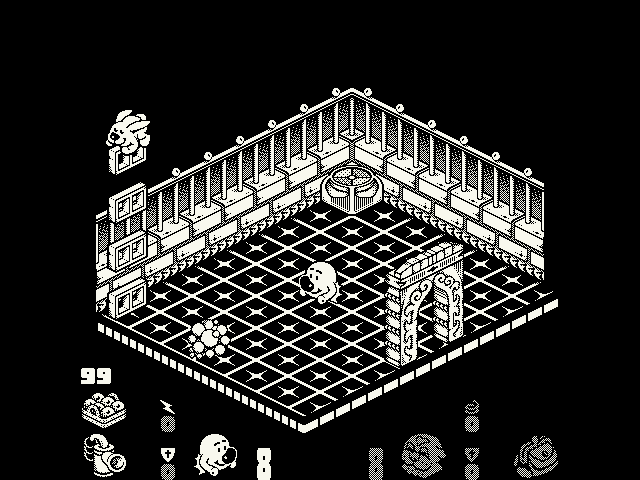
I still care about size: the macOS executable is about 120 KB, including all the graphics (packed with my own packer mentioned above) and the level data. The Windows exe is 159 KB.
Download
There is a package for all three platforms, each with SDL2 inside, so nothing has to be installed. The packages are at the bottom of the page, always with the latest version.
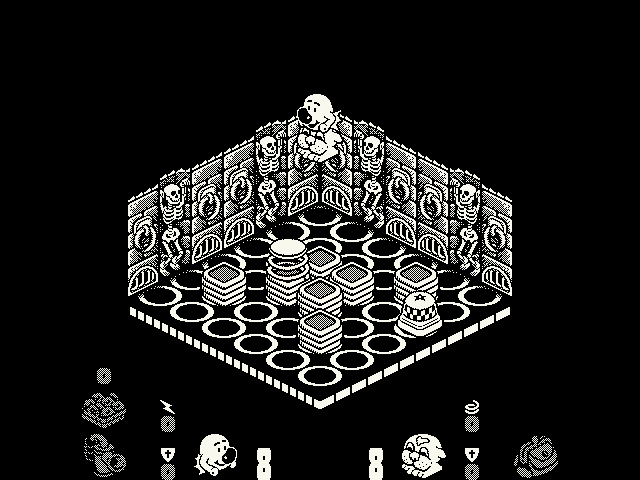
Map
The test harness learnt one more trick: it takes a picture of every room as it is at the start of the game — with the objects and the enemies, but without the heroes. These became the map of the game: all 301 rooms in their places in the game's axonometric space, the groups of rooms reachable only by teleport a bit further away, and the teleports joined with lines.
What's next? Playing and testing, and if all is well, the thing this whole project started for: the 68k version for the old Macs.
Update: who hides whom?
1st October 2026
While playing I noticed that a hero could sometimes stand so that an object was drawn in front of them although they did not seem to be behind it. That particular case turned out to be fine: Heels was standing on the tile behind the drum, and only the viewpoint made it look as if he were beside it. While digging into it, though, a real bug turned up. It comes from the original drawing order, so it is in the C64 and the Spectrum games too. The original inserts the objects into a sorted list by comparing them in pairs, and this sometimes gives a contradictory order: for example, when a hero stands on the edge of a block with another object behind the block, the edge of the block is drawn over the hero's feet or collar. A hero standing in a doorway could also get the step under the door drawn over them.

The remake now decides what goes in front by the objects' positions in space, in every redrawn area: whatever is nearer or higher is drawn later. Only the drawing changed; the object lists and the processing order stay as in the original, so the gameplay is the same step by step. A test walks Head over every reachable point of all 301 rooms, at three heights, and checks the order in every position. Only one doorway is left, where the hero stands under a block and three objects hide each other in a circle: there is no right order there, so it looks as it did before. The macOS executable didn't grow, and the download packages already contain the fixed version.
Update: big rooms, big window
4th October 2026
A few smaller things went in since the last update. When Heels stepped onto a block, the block of the same height in front of him covered the first pixels of his paws: now a hero above an object is always drawn in front of it. The status display and the room moved up 16 pixels, because in a 640x480 window the status display was too close to the edge of the picture. And the PLAY THE GAME menu got a CONTINUE: after leaving a game from the pause (Esc, Esc), you can go on exactly where you left off — and as the game is saved when you quit, CONTINUE is there at the next launch too.
The bigger change is about the big rooms. Some rooms are made of several rooms joined together and are bigger than the screen: on the C64 they simply ran off the edges of the picture. The remake now draws on a 1024x672 canvas whose middle is the 640x480 game screen. A bigger window, or full screen, shows the rest of the room, while the menus and the status display stay where they were. All 301 rooms were measured: even the biggest fits on the canvas. A 640x480 window shows as much as before.
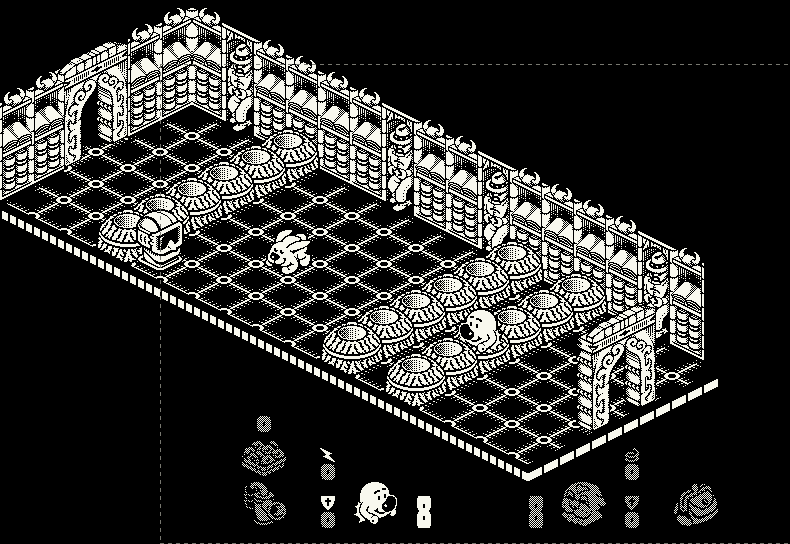
When I first saw such a room in one piece, the door on the left had only one post. It turned out not to be a drawing bug: when the original game builds a room, it only creates the objects that reach into its 256 pixel wide view. Whatever is outside is not just invisible — it doesn't exist. In 22 of the 301 rooms there are 136 such objects: 17 door posts, blocks, drums and a few enemies (in the room above: the post of the leftmost door, two drums and an enemy). In the remake they are all there now. This is a deliberate difference from the original: in these parts outside the picture the game plays a bit differently than on the C64, where the hero walked through nothing there.
And one drawing bug came with the last update: a door post's box is only 18 units high, but its picture carries half of the arch, up to 24 units. A hero falling behind a front door was "above the post" at the height of the arch, so he was drawn in front of it. Now a door post counts as high as its arch in the drawing order, and the arch hides a hero falling behind it.
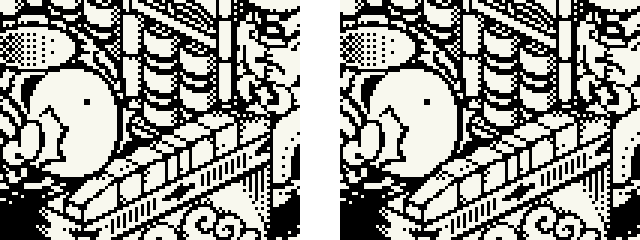
The macOS executable is still about 120 KB. The download packages contain this version; the Linux arm64 package used to freeze when a game started (on ARM the C language's char type is unsigned), the new one works.
E-ink, Playdate, and a smaller game
13th October 2026
The nine days since the last update were busy. Claude kept working on the project, and the game now runs on an e-paper panel and on the Playdate, it got a 512x342 version for the compact Macs, it got 11% smaller while staying exactly the same, its data got editors, and the first piece of the 68k Mac version — the sound — plays on an (emulated) Classic II. In order:
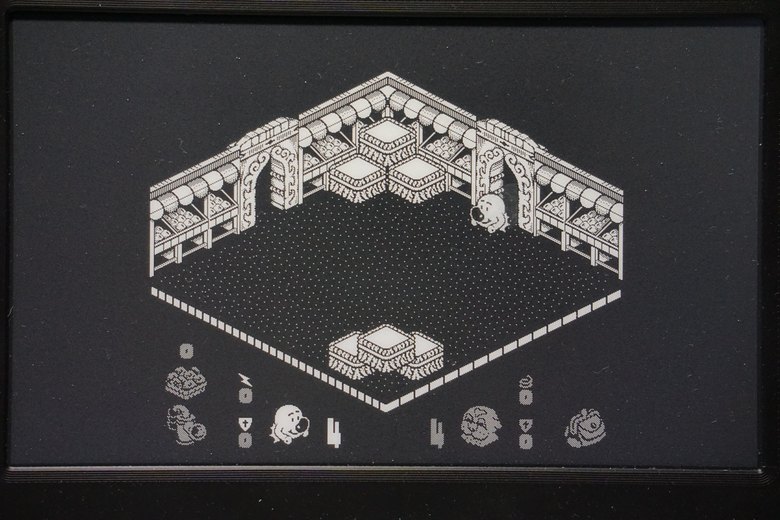
Head over Heels on e-paper
A Raspberry Pi 5 with a Waveshare 7.5" e-Paper panel: 800x480 pixels, 1 bit, black and white — just like the Classic II's screen, only on paper. The question was whether a panel like this can keep up with the original game's 12.5 pictures a second. The e-ink build runs at PAL speed and hands the panel one picture at the end of every original game step, so the panel sees exactly the steps the C64 drew. Only the changed rectangle is sent to the panel (over SPI, driven directly through Linux, without a library), and only that rectangle is refreshed.
The panel's own fastest partial refresh takes 380 ms, so only every fourth picture got through. But the controller can be given a waveform of our own: what voltage a pixel gets, frame by frame, depending on its old and new colour. A short one, 10 frames at 200 Hz, takes 80 ms, and the panel keeps up. Every new screen (a room, a menu page) gets a full refresh, which flashes the panel once and clears the ghosts of earlier pictures; meanwhile the game waits, so nobody walks blind. F12 cleans the panel at any time.
| partial refresh waveform | refresh time | pictures shown |
|---|---|---|
| the panel's own | 380 ms | 2.6 a second (3 of every 4 skipped) |
| own, 16 frames at 200 Hz | 112 ms | 8.3 a second |
| own, 10 frames at 200 Hz | 80 ms | 11.4 a second (keeps up) |
E-ink research: a camera watching the panel
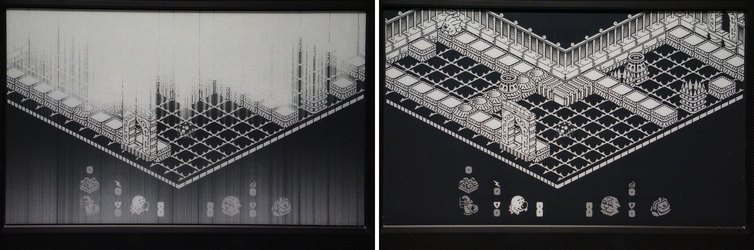
Two things were wrong. The biggest rooms came out broken after a full refresh: washed out, with grey streaks running down the whole panel. And moving characters left grey traces behind. Instead of guessing, we built a little lab. A Sony A6000 on the Mac's USB port, remote controlled with gphoto2, photographs the panel (macOS's own camera services grab every camera at once, so they are killed in a loop, every 50 ms, while gphoto2 opens it). One panel pixel is about 7.3 camera pixels. A grid of 16x10 white dots shown on the panel gives the mapping from panel to photo: a cubic polynomial, accurate to 0.6 camera pixels — a tenth of a panel pixel. After that, every one of the 384,000 panel pixels can be read out of a photo and compared with what should be there: the contrast, the grey "ghost" pixels, how close the moving pixels got to black and white. A lab program on the Pi sets every register of the panel's controller that matters: the temperature it believes it has, the booster, the voltages, the frame rate, the waveforms.
- The broken rooms came from a single byte. Waveshare's fast initialisation sets the booster (the circuit making the ±15 V for the pixels) to driving strength 4 of 8. The dense dithered walls of a big room make the column lines swing between +15 V and −15 V on most columns at once, the booster can't deliver the current, the voltage sags, and the pixels of those columns get too little drive. With strength 6, as in the normal refresh, every big room is clean.
- The full refresh: the panel's built-in waveforms take 3.6 s (normal), 1.1 s (fast) or 0.38 s, but the last one is only a partial refresh that leaves the old picture there: nothing in between. A full refresh of our own only works at a slow frame rate: at 200 Hz the whole panel turns grey and streaky (the same current problem), at 50 Hz it works. The best one drives a pixel that changes colour towards its new colour the whole time and flashes the others: 0.7 s instead of 1.5 s, and measured, it even leaves less of the previous screen (2.6% against 5.2%). But when I played with it, I liked the panel's own fast refresh better, so that stayed the default, and the quick one is a setting. The numbers don't see everything.
- The traces: 10 frames are fast enough, but too short to take a pixel all the way to black, and 20 frames take so long that pictures are skipped. The solution is a trick: the controller chooses a pixel's waveform by its old and its new colour, so a pixel that changed a moment ago is sent with its old colour inverted, and the controller "changes" it once more, towards the colour it already has. Every changed pixel gets three more short pushes in the next refreshes, and no refresh gets longer.
| measured on the photos | before | after |
|---|---|---|
| F98 and the other big rooms | broken | clean |
| Head walking: pictures skipped / grey pixels left | 10 of 49 / 31 | 0 / 1 |
| a lift for 10 s: pictures skipped / grey pixels left | 53 of 145 / 2,393 | 4 / 302 |
| full refresh (the game waits) | 1.5 s | 1.5 s (quick: 0.7 s) |
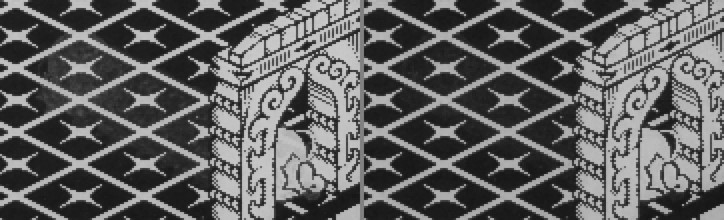
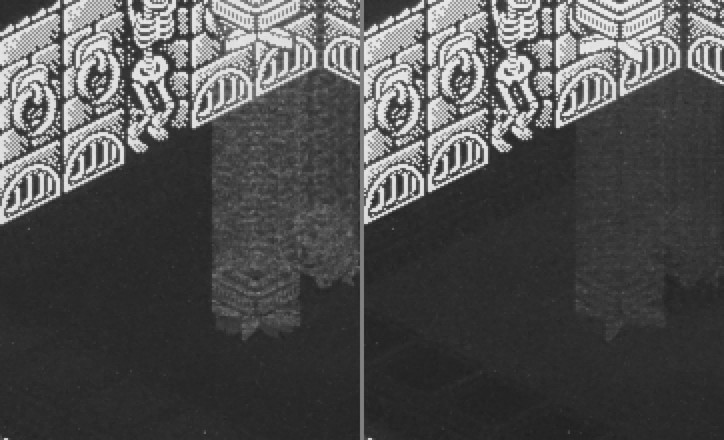
On the way, the score screen turned out to make a full refresh every 5 seconds: a frame counter was a byte and wrapped around every 256 frames. Not tried yet: the panel's temperature (our waveforms are not temperature compensated), a faster SPI clock, and the panel's real VCOM voltage.
512x342: the compact Mac's screen
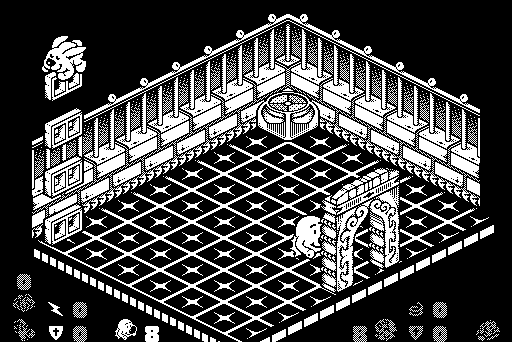
The 68k version's main target is the 512x342 screen of the compact Macs (Plus, SE, Classic, Classic II), so the C version can now be built for it too. Its layout is the one I made in 2015 for the JavaScript remake's 512 mode: its menus, and its status display with 24x24 mini sprites in the bottom corners (they were in the sprite data all along, just at a wrong place in the old table). The view is the original screen's whole 256 pixel width and its top 171 of 192 lines, doubled; the 21 lines left out at the bottom are where the original has its status display. The window only takes whole multiples of 512x342, so the pixels stay sharp.
Smaller, and exactly the same
A review of where the code could be shorter found 160 places, mostly code written several times over: the four walls of a room, the four collision routines, the menu pages. The game's code segment went from 92,256 to 81,696 bytes, five 16 KB pages instead of six; the macOS executable from 120 KB to 103 KB, all graphics, sound and level data included. The graphics are now packed by the new version of my MPackerX (an optimal parse, the same format the C64, 68k and JavaScript unpackers read), every sprite block a stream of its own, the way the 68k version will load them as resources.
How do we know the game stayed the same? A regression harness: the test build writes a hash of the screen, of what went to the window, of the whole game state and of the sounds, in every frame. 1,384 scenarios (random play in all 301 rooms, whole games from the menu, saving and loading, every room's picture, the drawing order tests) run with the old and the new build, in 5 configurations (30 and 25 fps, 512x342, without the trainer, and with the release's optimisation), and are compared frame by frame: 0 differences.
The macOS packages are now two, one for Apple Silicon and one for Intel, each half the size of the old universal one, and they are notarized by Apple: they open with a double click.
The data in files, editors in the browser
The game's data now comes from plain files: the sprite sheet and the font as PNG pictures, the sound data as a binary, the intro text as text; a build step packs whatever changed. The sound data is packed too now: 1,953 bytes in the executable instead of 3,263. And there are two editors for it, plain HTML and JavaScript that open from the disk:
- The level editor decodes the rooms, the collectibles, the teleports and the object types straight from the C64 memory image, and draws every room exactly like the remake does (checked pixel by pixel on all 301 rooms). It builds the level data with macros it finds itself: 5,275 bytes instead of the original 5,399 in the C64 format — or it keeps the original byte for byte. It exports for the C64 (data blocks, a patched memory image, an assembler listing) and for the remake.
- The music editor unfolds the 15 tunes and 18 sound effects into flat tracks per voice, plays them through a JavaScript port of the game's player (the same SID registers in every frame as the C one) and Hermit's jsSID, and edits notes, instruments and effects. Writing the data back, it looks for shared (also transposed) blocks: 3,002 bytes instead of the original 3,263. It exports for the remake, the C64 and the 68k player.
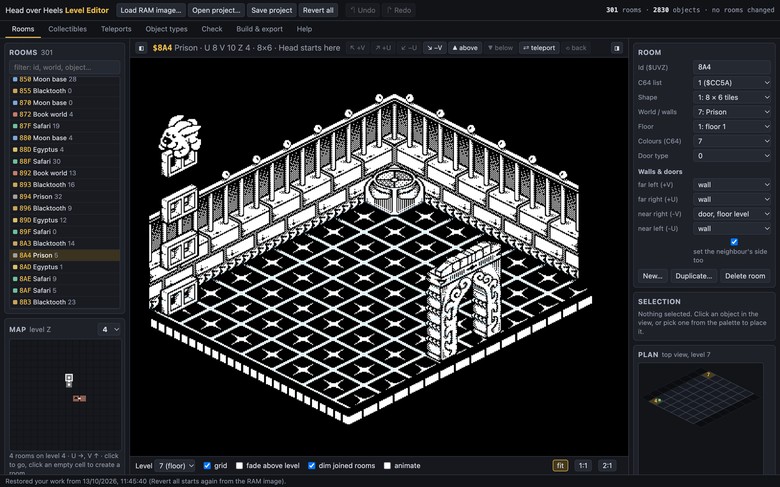
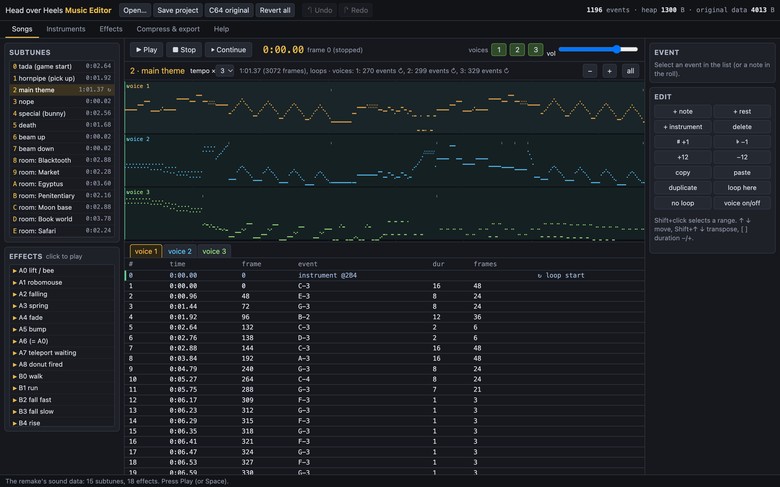
Two smaller things: before the main menu an intro page tells what the project is, written with the terminal font of the Cattail Scroller; and in trainer mode the top corners show the room, the score, the rooms visited and the fish saves left (F1 hides them).
Head over Heels on the Playdate
The same game on the Playdate: a 400x240, 1 bit screen and a 168 MHz Cortex-M7. The game code is the same, only the platform layer is new, and the third screen layout can also be built for the desktop, so it is tested with the usual tools. The rooms are bigger than the screen: the view starts where the original game shows the room and scrolls only to keep the character in the picture. The crank looks around: up and down, and keep turning at an edge and the view goes on sideways, then up or down again, in a snake over the whole room. The status display sits over the room, every item with a 2 pixel black outline. A jumps, B carries or fires, A and B together swop. The poster and the main menu are my drawings.
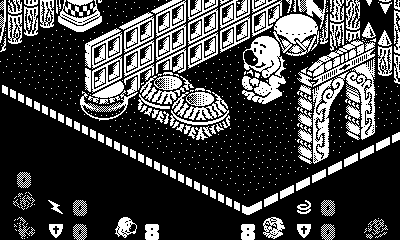
The sound needed the most work. The SID emulation (Hermit's cSID) computes things like exp(), pow() and divisions in double precision for every sample, and the Playdate's processor does doubles in software. But all of these depend only on SID registers, so the Playdate's copy computes them only when a register changes, or takes them from tables generated by the original code itself — with every expression kept, so the sound is the same bit for bit: 8,040 seconds of tunes and effects compared. On the device it was still too much, so by default the voices run at 22,050 Hz and are interpolated up to 44,100 Hz, where the filter runs with exact coefficients. The download is 99 KB.
Playing on the Playdate found two bugs that were in every build. Walking from room 420 to 410, Head fell through the floor and kept falling: the remake's half steps put him at a position the original never reaches, where he was already in the doorway but got the height of the other, raised door. And after teleporting together, Head stayed behind while Heels walked away: the arrival animation clears Heels' "tall" flag (the C64 and the Spectrum code do the same), so Heels was moved alone; the remake now sets it again when the animation ends. Both are fixed in every version, and the packages at the bottom of the page are rebuilt.
Towards the 68k Mac: the SID in assembly
Back in 2017 the question was how a 16 MHz 68030 could play the music besides running the game. Now there is an answer: Hermit's cSID, ported to 68k assembly (about 5 KB), playing through the Sound Manager's double buffering, driven by my 68k port of the game's music player. It was tested first on the Mac: the real 68k code ran in a 68040 emulator, the player set the same voice registers as the C player in every tick of all 15 tunes, and the sound agreed with cSID. The test also found that the arpeggios in my 68k player didn't work (the main theme and the in-game tune); fixed.
Then it was built with Fantasm / Anvil in an emulated LC 475 and Classic II — my own emulator of the two machines, made for this work, which Claude can drive: build in Anvil, run, measure the cycles, capture every byte written to the sound chip. On the LC 475 the sound is bit-identical to the host test. On the Classic II, 22 kHz needs the whole processor (22.9 ms to render 23 ms of sound), but at 11 kHz it plays without a dropout, also bit-identical:
| Classic II, 11 kHz | CPU time |
|---|---|
| main theme | 48% |
| in-game tune | 34% |
| sound effects | 21–30% |
| room jingle | 7% |
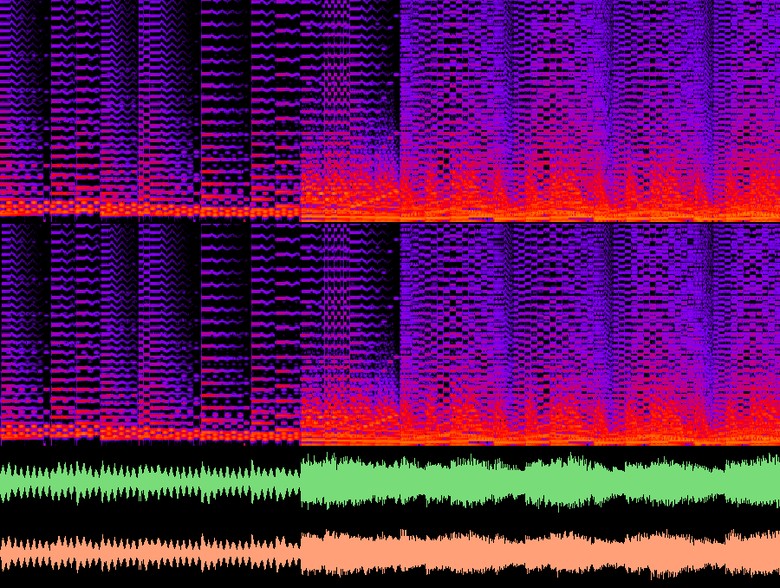
So on the Classic II the game gets about half of the processor while the main theme plays; there is room for improvement (the filter keeps working on silence after some effects). The real machines are still to come.
What's next? The 68k version itself. Its skeleton is ready: the C version walked through for the assembly version, every structure, variable and function with its inputs, outputs and role, the 640x480 and 512x342 layouts side by side, and the Mac platform layer to write. The rest is mine to fill with 68k code.
Download
Latest version: 13th October 2026
The remake for macOS, Windows and Linux; every package has SDL2 inside, so nothing has to be installed:
macOS 11 or later on Apple Silicon, 10.13 or later on Intel; signed and notarized by Apple, so it opens with a double click. Windows 7 or later (64 bit). Linux from Debian 11 / Ubuntu 20.04 (x86_64 and arm64, X11 or Wayland).
The Playdate version has a page of its own, with the download and how to install it: